Text classification is one of the most common tasks in computational text analysis. Given a piece of t ext, we want to assign it to one of several predefined categories. In this lab, we’ll learn how to build text classifiers, starting with simple approaches and working up to modern transformer-based models.
Our task is practical: we’ll build an intent classifier for a banking chatbot. When a user types “I lost my card” or “Why is my transfer pending?”, the system needs to understand what they want and route them to the appropriate response. This is the core challenge behind conversational interfaces.
1 The Banking77 dataset
We’ll use the Banking77 dataset, which contains customer service queries labeled with 77 different intents. This dataset was created specifically for research on intent classification in the banking domain.
To use the data, you will need to dowload the following files from this repository:
categories.json: contains a list of categories in the target varible;
test.csv: a small subsample for validating our classifiers;
train.csv: a sample we will you for training.
import pandas as pdimport numpy as npimport matplotlib.pyplot as plt# Load the datatrain_df = pd.read_csv("data/banking_data/train.csv")test_df = pd.read_csv("data/banking_data/test.csv")print(f"Training examples: {len(train_df):,}")print(f"Test examples: {len(test_df):,}")print(f"Total: {len(train_df) +len(test_df):,}")
Training examples: 10,003
Test examples: 3,080
Total: 13,083
Let’s look at the structure of the data:
train_df.head(10)
text
category
0
I am still waiting on my card?
card_arrival
1
What can I do if my card still hasn't arrived ...
card_arrival
2
I have been waiting over a week. Is the card s...
card_arrival
3
Can I track my card while it is in the process...
card_arrival
4
How do I know if I will get my card, or if it ...
card_arrival
5
When did you send me my new card?
card_arrival
6
Do you have info about the card on delivery?
card_arrival
7
What do I do if I still have not received my n...
card_arrival
8
Does the package with my card have tracking?
card_arrival
9
I ordered my card but it still isn't here
card_arrival
Each row contains a customer message (text) and its intent category (category). The messages are short, informal queries - exactly what you’d expect from a chat interface.
1.1 Exploring the intent categories
How many unique intents are there, and what do they look like?
import json# Load the category nameswithopen("data/banking_data/categories.json") as f: categories = json.load(f)print(f"Number of intent categories: {len(categories)}")print(f"\nFirst 15 categories:")for cat in categories[:15]:print(f" - {cat}")
These are fine-grained categories. Notice how some are quite similar: card_arrival vs card_delivery_estimate, or lost_or_stolen_card vs compromised_card. Distinguishing between such similar intents is challenging - both for machines and for humans.
1.2 Class distribution
Are the intents evenly distributed, or are some more common than others?
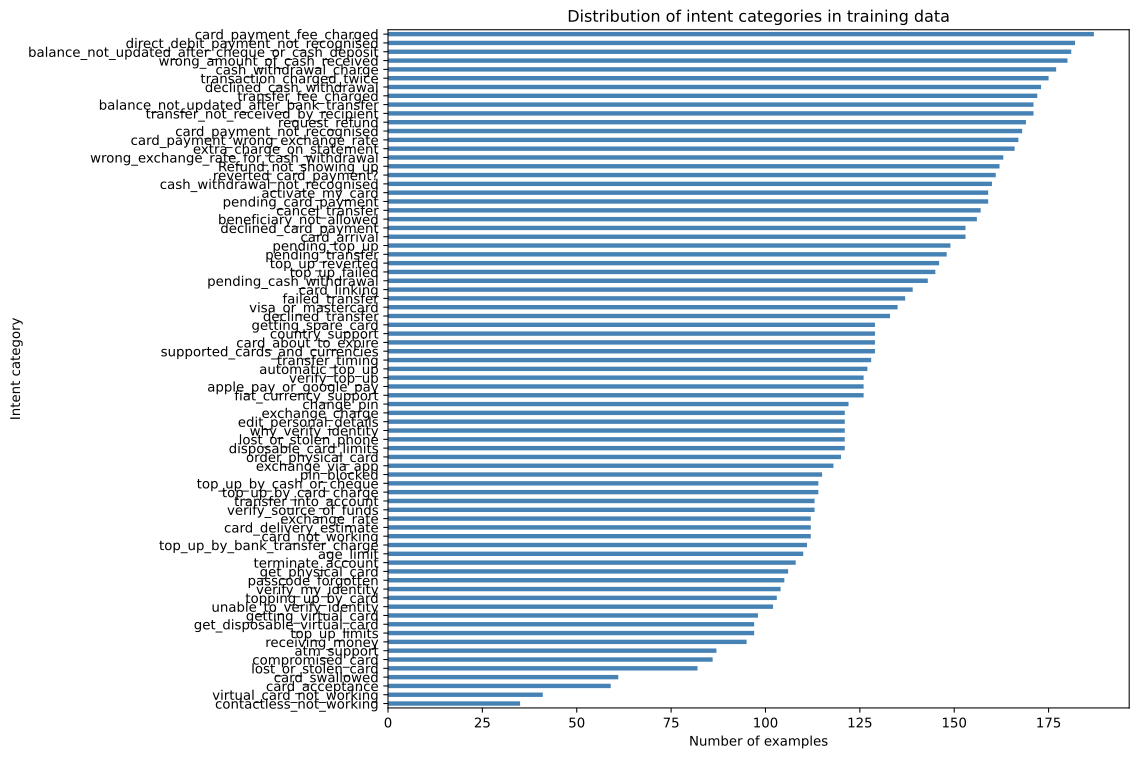
intent_counts = train_df['category'].value_counts()fig, ax = plt.subplots(figsize=(12, 8))intent_counts.plot(kind='barh', ax=ax, color='steelblue')ax.set_xlabel("Number of examples")ax.set_ylabel("Intent category")ax.set_title("Distribution of intent categories in training data")ax.invert_yaxis() # Most common at topplt.tight_layout()plt.show()print(f"\nMost common intent: {intent_counts.index[0]} ({intent_counts.iloc[0]} examples)")print(f"Least common intent: {intent_counts.index[-1]} ({intent_counts.iloc[-1]} examples)")print(f"Mean examples per intent: {intent_counts.mean():.1f}")
Most common intent: card_payment_fee_charged (187 examples)
Least common intent: contactless_not_working (35 examples)
Mean examples per intent: 129.9
The distribution is relatively balanced - most intents have similar numbers of examples. This is good news for training: we won’t have to worry too much about class imbalance. The fewer examples a category has, the harder it will be to train a classifier to identify it.
1.3 Sample messages by intent
Let’s look at some example messages for a few intents to get a feel for the data:
sample_intents = ['lost_or_stolen_card', 'card_arrival', 'request_refund', 'transfer_timing']for intent in sample_intents:print(f"\n{intent.upper()}")print("-"*40) samples = train_df[train_df['category'] == intent]['text'].head(5)for msg in samples:print(f" • {msg}")
LOST_OR_STOLEN_CARD
----------------------------------------
  • Has there been any activity on my card today?
  • I lost my wallet and all my cards were in it.
  • I'm panicking!  I lost my card!  Help!
  • I need to report a stolen card
  • How do I replace a stolen card?

CARD_ARRIVAL
----------------------------------------
  • I am still waiting on my card?
  • What can I do if my card still hasn't arrived after 2 weeks?
  • I have been waiting over a week. Is the card still coming?
  • Can I track my card while it is in the process of delivery?
  • How do I know if I will get my card, or if it is lost?

REQUEST_REFUND
----------------------------------------
  • How long does it take to get a refund on something I bought?
  • Please tell me how to get a refund for something I bought.
  • Can i cancel this purchase?
  • I want to return an item for a refund can I do that?
  • Can I request a refund

TRANSFER_TIMING
----------------------------------------
  • How long am I to wait before the transfer gets to my account?
  • Will the transfer show up in my account soon?
  • What time will a transfer from the US take?
  • When will the money reach my  account?
  • How long does it take to get my money
Notice the variation in how people phrase the same intent. “I lost my card”, “My card was stolen”, “Someone took my card” - all express the same need but with different words. A good classifier needs to recognize this.
2 The machine learning workflow
Before diving into code, let’s understand the workflow we’ll follow.
Prepare features: Convert text into numbers that algorithms can process
Split data: Keep some data aside to test our model fairly
Train a model: Let the algorithm learn patterns from training data
Predict: Apply the model to new, unseen data
Evaluate: Measure how well our predictions match reality
This workflow is the same regardless of whether we use a simple model or a complex one. The difference is in step 1 (how we represent text) and step 3 (which algorithm we use).
2.1 Why we hold out test data
A model that has seen all the data during training can simply memorize it. Such a model would perform perfectly on the training data but fail on new messages it hasn’t seen before. This problem is called overfitting.
To get an honest estimate of how well our model will work in practice, we need to test it on data it has never seen during training. The Banking77 dataset conveniently comes with a separate test set, so we’ll use that.
ImportantThe golden rule of evaluation
Never evaluate your model on data it was trained on. Always use a held-out test set.
3 Baseline: TF-IDF with logistic regression
In industry, you always start with a simple baseline. If a complex model can’t beat the baseline, there’s no point deploying it. Our baseline will use TF-IDF features (which we encountered in Lab 04) with logistic regression.
3.1 Why logistic regression?
Logistic regression is the workhorse of text classification:
Trains in seconds, even on large datasets
Predictions are fast (important for real-time chatbots)
Interpretable: you can see which words drive each classification
Often surprisingly effective
It’s the first thing most practitioners try, and sometimes it’s all you need.
3.2 Creating TF-IDF features
TF-IDF (Term Frequency-Inverse Document Frequency) converts each message into a vector of numbers, where each dimension represents a word. Words that appear frequently in a specific message but rarely across all messages get higher weights.
from sklearn.feature_extraction.text import TfidfVectorizer# Create TF-IDF featuresvectorizer = TfidfVectorizer( max_features=5000, # Limit vocabulary size ngram_range=(1, 2), # Include unigrams and bigrams stop_words='english')# Fit on training data, transform both train and testX_train_tfidf = vectorizer.fit_transform(train_df['text'])X_test_tfidf = vectorizer.transform(test_df['text'])print(f"Training feature matrix: {X_train_tfidf.shape}")print(f"Test feature matrix: {X_test_tfidf.shape}")print(f"Vocabulary size: {len(vectorizer.vocabulary_):,} terms")
Training feature matrix: (10003, 5000)
Test feature matrix: (3080, 5000)
Vocabulary size: 5,000 terms
Each message is now represented as a sparse vector of 5,000 dimensions. Most values are zero (the message doesn’t contain most words), which is why we use sparse matrices to save memory.
Note that we apply the same preprocessing for test data. If the new data has features our algorithms has never seen, it won’t be able to recognize it. If we have such a mismatch between train and test (new) data, at the least we will get an error but not every package will check for it. For the real world systems, this requires tracking your data through different stages of transformation with unique identifiers. Such an identifier (a column) will enable you to match a prediction to the unprocessed data.
# Predict on test sety_pred_lr = lr_model.predict(X_test_tfidf)# Check accuracyfrom sklearn.metrics import accuracy_scoreaccuracy = accuracy_score(y_test, y_pred_lr)print(f"Accuracy: {accuracy:.1%}")
Accuracy: 82.4%
Not bad for a simple model. But accuracy alone doesn’t tell the whole story, especially with 77 classes. Let’s dig deeper.
4 Evaluating classifier quality
When our model predicts an intent, there are four possible outcomes:
True Positive (TP): Model predicted intent X, and it was actually X
True Negative (TN): Model predicted not-X, and it was actually not-X
False Positive (FP): Model predicted intent X, but it was actually something else
False Negative (FN): Model predicted something else, but it was actually X
These combine into several useful metrics.
4.1 The confusion matrix
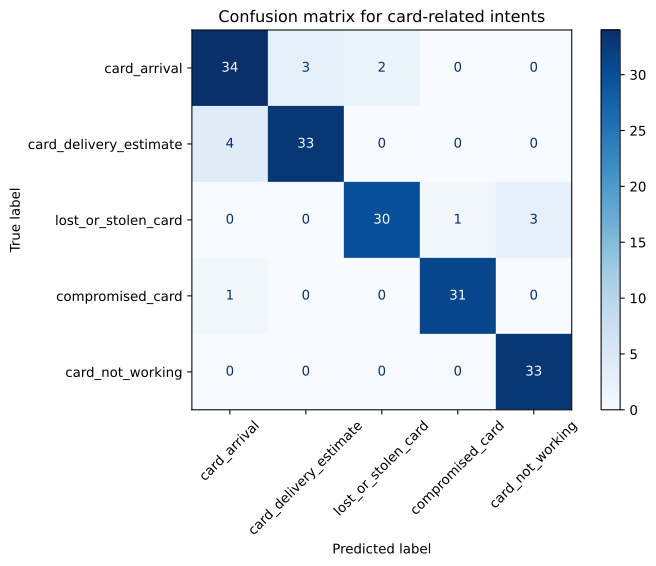
A confusion matrix shows, for each true class, how many examples were predicted as each class. Let’s look at a subset of intents to keep it readable:
from sklearn.metrics import confusion_matrix, ConfusionMatrixDisplay# Select a subset of similar intents for visualizationsimilar_intents = ['card_arrival', 'card_delivery_estimate', 'lost_or_stolen_card','compromised_card','card_not_working']# Filter to just these intentsmask_train = train_df['category'].isin(similar_intents)mask_test = test_df['category'].isin(similar_intents)# Get predictions for this subsety_test_subset = y_test[mask_test]y_pred_subset = y_pred_lr[mask_test]# Create confusion matrixcm = confusion_matrix(y_test_subset, y_pred_subset, labels=similar_intents)fig, ax = plt.subplots(figsize=(8, 6))disp = ConfusionMatrixDisplay(confusion_matrix=cm, display_labels=similar_intents)disp.plot(ax=ax, cmap='Blues', xticks_rotation=45)ax.set_title("Confusion matrix for card-related intents")plt.tight_layout()plt.show()
Read this matrix row by row. Each row shows the true intent, and the columns show what the model predicted. Diagonal cells are correct predictions; off-diagonal cells are errors.
Notice any patterns? Similar intents (like card_arrival and card_delivery_estimate) are more likely to be confused with each other than with unrelated intents.
4.2 Precision, recall, and F1
For each intent category, we can calculate:
Metric
Question it answers
Formula
Precision
“When the model predicts this intent, how often is it correct?”
TP / (TP + FP)
Recall
“Of all messages with this intent, how many did the model find?”
TP / (TP + FN)
F1 Score
“What’s the balance between precision and recall?”
2 × (Precision × Recall) / (Precision + Recall)
Let’s see these metrics for our model:
from sklearn.metrics import classification_reportprint(classification_report(y_test, y_pred_lr, zero_division=0))
The report shows metrics for each intent, plus summary statistics at the bottom:
support: The number of test examples for each class (here, 40 per intent)
macro avg: Simple average across all classes (treats rare and common classes equally)
weighted avg: Average weighted by class frequency (reflects overall performance)
The “accuracy” row can be confusing: the value under the F1 column (0.82) is overall accuracy, not an F1 score. Scikit-learn places it there for layout convenience. The true average F1 scores are in the macro avg and weighted avg rows.
Note that in this case we have matching values for accuracy and “macro avg” or average F1 score. This is rather by chance, and not because they measure the same thing. Accuracy is the share of correct predictions across all prediction, while F1 is a more nuanced and informative measure. In general, pay more attention to F1 as accuracy can be misleading. It is worthwhile to read documentation to learn what exactly “accuracy” stands for in each case.
4.3 Interpreting the results
Look at the per-class F1 scores. Some intents are classified nearly perfectly (F1 > 0.90), while others are more challenging (F1 < 0.70). Why might that be?
# Parse the classification report to find best and worst performing intentsfrom sklearn.metrics import precision_recall_fscore_supportprecision, recall, f1, support = precision_recall_fscore_support( y_test, y_pred_lr, average=None, labels=lr_model.classes_, zero_division=0)# Create a summary DataFrameperformance_df = pd.DataFrame({'intent': lr_model.classes_,'precision': precision,'recall': recall,'f1': f1,'support': support}).sort_values('f1')print("Intents with lowest F1 scores:")print(performance_df.head(10).to_string(index=False))print("\nIntents with highest F1 scores:")print(performance_df.tail(10).to_string(index=False))
Intents with distinctive vocabulary tend to be easier to classify. Intents that share words with other intents are harder. This is a fundamental limitation of bag-of-words approaches like TF-IDF: they treat words independently and miss context.
4.4 What logistic regression learns
One advantage of logistic regression is interpretability. We can look at which words are most predictive of each intent:
def get_top_features(model, vectorizer, class_name, n=10):"""Get the top n features for a given class.""" class_idx =list(model.classes_).index(class_name) feature_names = vectorizer.get_feature_names_out() coefs = model.coef_[class_idx] top_indices = coefs.argsort()[-n:][::-1]return [(feature_names[i], coefs[i]) for i in top_indices]# Look at top features for a few intentsfor intent in ['lost_or_stolen_card', 'request_refund', 'transfer_timing']:print(f"\nTop words for '{intent}':")for word, weight in get_top_features(lr_model, vectorizer, intent):print(f" {word:25s}{weight:.3f}")
Top words for 'lost_or_stolen_card':
  stolen                    4.640
  card                      4.164
  lost                      3.973
  card stolen               3.457
  lost card                 3.053
  help                      2.383
  missing                   2.200
  stolen card               1.809
  card missing              1.800
  card lost                 1.670

Top words for 'request_refund':
  refund                    8.355
  item                      4.473
  purchase                  3.824
  bought                    3.192
  cancel                    2.981
  refunded                  2.782
  product                   2.562
  return                    2.556
  order                     2.535
  want                      2.397

Top words for 'transfer_timing':
  transfer                  5.597
  long                      4.117
  europe                    3.925
  china                     3.181
  transfer china            3.007
  account                   2.375
  wait                      2.359
  time                      2.285
  transfers                 2.233
  money                     1.920
These make sense. “Lost”, “stolen”, and “card” are strong signals for the lost_or_stolen_card intent. This interpretability is valuable: if the model makes mistakes, you can often understand why.
5 The power of BERT
Logistic regression with TF-IDF is a solid baseline, but it has limitations. It treats each word independently and ignores word order and context. The phrases “I lost my card” and “my lost card” would have identical representations.
BERT (Bidirectional Encoder Representations from Transformers) addresses these limitations. It understands context: the word “lost” in “I lost my card” means something different from “lost” in “I’m lost in the app.”
In Lab 07, we used BERT to create embeddings for clustering. Now we’ll use it for classification, in two ways:
BERT as feature extractor: Use pre-trained BERT to create embeddings, then train a simple classifier on top
Fine-tuning BERT: Adjust BERT’s weights specifically for our classification task
5.1 BERT as feature extractor
This approach is simple: we use a pre-trained BERT model to convert each message into a dense vector (embedding), then train logistic regression on these embeddings - just as we did with TF-IDF.
from sentence_transformers import SentenceTransformer# Load a pre-trained sentence transformer model# This is the same model we used in Lab 07bert_model = SentenceTransformer('all-MiniLM-L6-v2')print("Encoding training messages...")X_train_bert = bert_model.encode( train_df['text'].tolist(), show_progress_bar=True, convert_to_numpy=True)print("\nEncoding test messages...")X_test_bert = bert_model.encode( test_df['text'].tolist(), show_progress_bar=True, convert_to_numpy=True)print(f"\nTraining embeddings shape: {X_train_bert.shape}")print(f"Test embeddings shape: {X_test_bert.shape}")
Encoding training messages...
Encoding test messages...
Training embeddings shape: (10003, 384)
Test embeddings shape: (3080, 384)
Each message is now a 384-dimensional dense vector (much smaller than our 5,000-dimensional TF-IDF vectors, but carrying richer semantic information).
Using BERT as a feature extractor is effective, but can we do better by fine-tuning? Fine-tuning adjusts BERT’s internal weights specifically for our classification task, allowing it to learn task-specific patterns.
An important caveat: the sentence transformer we used above (all-MiniLM-L6-v2) was already trained specifically for creating good sentence embeddings. When we fine-tune distilbert-base-uncased, we’re starting from a model that was trained for masked language modeling, not sentence similarity. This means fine-tuning may not always outperform well-designed pre-trained embeddings, especially with limited training.
NoteCompute requirements
Fine-tuning BERT is more computationally intensive than the approaches above. On a laptop without a GPU, training may take 10-20 minutes. With a GPU, it takes 2-5 minutes.
import os# Disable interactive prompts before importing transformersos.environ["WANDB_DISABLED"] ="true"os.environ["WANDB_MODE"] ="disabled"os.environ["HF_HUB_DISABLE_TELEMETRY"] ="1"os.environ["TOKENIZERS_PARALLELISM"] ="false"from transformers import ( AutoTokenizer, AutoModelForSequenceClassification, TrainingArguments, Trainer)from datasets import Datasetimport torch# Check if GPU is availabledevice ="cuda"if torch.cuda.is_available() else"cpu"print(f"Using device: {device}")# Create label mappingslabel2id = {label: i for i, label inenumerate(categories)}id2label = {i: label for label, i in label2id.items()}# Convert to Hugging Face Dataset formattrain_dataset = Dataset.from_pandas(train_df)test_dataset = Dataset.from_pandas(test_df)# Load tokenizer and modelmodel_name ="distilbert-base-uncased"tokenizer = AutoTokenizer.from_pretrained(model_name)model = AutoModelForSequenceClassification.from_pretrained( model_name, num_labels=len(categories), id2label=id2label, label2id=label2id, use_safetensors=False# to get CUDA working)# Tokenize the datadef tokenize_function(examples):return tokenizer( examples["text"], padding="max_length", truncation=True, max_length=64# Banking queries are short )# Add numeric labelsdef add_labels(examples): examples["label"] = [label2id[cat] for cat in examples["category"]]return examplestrain_dataset = train_dataset.map(add_labels, batched=True)test_dataset = test_dataset.map(add_labels, batched=True)train_dataset = train_dataset.map(tokenize_function, batched=True)test_dataset = test_dataset.map(tokenize_function, batched=True)
Using device: cuda
Some weights of DistilBertForSequenceClassification were not initialized from the model checkpoint at distilbert-base-uncased and are newly initialized: ['classifier.bias', 'classifier.weight', 'pre_classifier.bias', 'pre_classifier.weight']
You should probably TRAIN this model on a down-stream task to be able to use it for predictions and inference.
import numpy as npfrom sklearn.metrics import f1_score# Define a function to compute metrics during trainingdef compute_metrics(eval_pred): logits, labels = eval_pred predictions = np.argmax(logits, axis=-1) f1 = f1_score(labels, predictions, average='macro')return {"f1": f1}# Set up training argumentstraining_args = TrainingArguments( output_dir="./results", num_train_epochs=8, # Enough epochs for convergence per_device_train_batch_size=16, # Smaller batches for better gradients per_device_eval_batch_size=64, learning_rate=3e-5, # Standard BERT fine-tuning learning rate warmup_ratio=0.06, # Warmup as fraction of total steps weight_decay=0.01, logging_dir="./logs", logging_steps=100, eval_strategy="epoch", save_strategy="epoch", load_best_model_at_end=True, metric_for_best_model="f1", greater_is_better=True, report_to=[], # Disable all reporting (wandb, mlflow, tensorboard) disable_tqdm=False, # Keep progress bars for feedback push_to_hub=False, # Don't try to push to Hugging Face Hub)# Create Trainertrainer = Trainer( model=model, args=training_args, train_dataset=train_dataset, eval_dataset=test_dataset, compute_metrics=compute_metrics, # Track F1 during training)# Train the modelprint("Fine-tuning BERT (this may take several minutes)...")trainer.train()
Fine-tuning BERT (this may take several minutes)...
# Evaluate the fine-tuned modelpredictions = trainer.predict(test_dataset)y_pred_finetuned = predictions.predictions.argmax(axis=1)y_test_numeric = [label2id[cat] for cat in y_test]accuracy_finetuned = (y_pred_finetuned == y_test_numeric).mean()print(f"Fine-tuned BERT accuracy: {accuracy_finetuned:.1%}")# Convert predictions back to category names for classification reporty_pred_finetuned_labels = [id2label[i] for i in y_pred_finetuned]print("\nClassification report for fine-tuned BERT:\n")print(classification_report(y_test, y_pred_finetuned_labels, zero_division=0))
With sufficient training (8 epochs), fine-tuned DistilBERT outperforms the BERT embeddings approach. However, note that the improvement required significantly more compute time and careful hyperparameter tuning. The BERT embeddings approach achieved strong results with no training at all - just embedding extraction and logistic regression.
6.1 When to use which approach
The choice depends on your constraints:
Use TF-IDF + Logistic Regression when:
You need a quick baseline to understand the problem
Interpretability is important (regulated industries, debugging)
You have limited compute resources
Latency is critical (real-time systems)
Use BERT embeddings + simple classifier when:
You want better accuracy than TF-IDF without the complexity of fine-tuning
You have limited labeled data (embeddings work well even with few examples)
You want fast iteration (no GPU training required)
You need a strong model quickly
Use fine-tuned BERT when:
You have a large labeled dataset (tens of thousands of examples)
You have compute resources and time for hyperparameter tuning
Your task is domain-specific and pre-trained embeddings may not capture the nuances
You’ve already tried embeddings and need to push accuracy further
We haven’t looked at any other classical ML-algorithms beyond Logistic Regression that might perform better with these data while easier to configure than fine-tuned BERT. Before committing to fine-tuning, it is worth it to try these: Naive Bayes, SVM (Support Vector Machines) and Random Forests. There are many more but these four are battle-tested and next to the standard choice to consider before settling with one specific algorithm.
TipIndustry wisdom
Always start with the simple baseline. BERT embeddings with logistic regression often provide an excellent accuracy-to-effort ratio. Fine-tuning is worth the investment only when you have enough data and the simpler approaches fall short.
7 Cross-validation: More reliable estimates
So far, we’ve evaluated on a single train/test split. But what if we got lucky (or unlucky) with that particular split? Cross-validation gives us more reliable performance estimates.
from sklearn.model_selection import cross_val_score, StratifiedKFold# 5-fold cross-validation on TF-IDF + LogRegcv = StratifiedKFold(n_splits=5, shuffle=True, random_state=42)# Combine train and test for cross-validationX_all_tfidf = vectorizer.fit_transform( pd.concat([train_df['text'], test_df['text']]))y_all = pd.concat([train_df['category'], test_df['category']])cv_scores = cross_val_score( LogisticRegression(max_iter=1000, random_state=42), X_all_tfidf, y_all, cv=cv, scoring='accuracy')print(f"Cross-validation scores: {cv_scores}")print(f"Mean accuracy: {cv_scores.mean():.1%} (± {cv_scores.std()*2:.1%})")
The mean gives us a more stable estimate, and the standard deviation tells us how much variance to expect. If the variance is high, our single-split estimate might be misleading.
Note: we use 5-fold here for speed but the standard is at least 10-fold.
8 Practical considerations
8.1 Handling class imbalance
Our dataset is relatively balanced, but many real-world datasets are not. If some intents are rare, the model may learn to ignore them. Strategies include:
Stratified splits: Ensure each fold has the same class distribution (we did this)
Class weights: Tell the model to pay more attention to rare classes
Oversampling/undersampling: Artificially balance the training data
# Example: using class weightslr_balanced = LogisticRegression( max_iter=1000, class_weight='balanced', # Automatically adjusts for class frequency random_state=42)lr_balanced.fit(X_train_tfidf, y_train)y_pred_balanced = lr_balanced.predict(X_test_tfidf)print(f"Accuracy with balanced weights: {(y_pred_balanced == y_test).mean():.1%}")
Accuracy with balanced weights: 83.6%
8.2 Error analysis
Looking at what the model gets wrong often reveals insights:
# Look at specific errorstop_confusion = confusion_pairs.head(1)true_intent, pred_intent = top_confusion.index[0]print(f"\nExamples where '{true_intent}' was predicted as '{pred_intent}':\n")examples = errors[(errors['true'] == true_intent) & (errors['predicted'] == pred_intent)]for _, row in examples.head(5).iterrows():print(f" • {row['text']}")
Examples where 'virtual_card_not_working' was predicted as 'get_disposable_virtual_card':

  • Why is my disposable virtual card being denied?
  • My disposable virtual card doesn't seem to work
  • My disposable virtual card is broken.
  • Why did the disposable virtual card which I used to pay a gym subscription get denied?
  • My disposable virtual card will not work
Error analysis often reveals ambiguous cases where even humans might disagree, or systematic patterns that suggest ways to improve the model or refine the intent categories.
8.3 Ethical considerations
Text classifiers can have real consequences for users. Consider:
What happens when the model is wrong? A chatbot that misroutes a frustrated customer makes things worse. Always provide fallback to human support.
Bias in training data: If training data underrepresents certain phrasings (accents, dialects, non-native speakers), the model may perform worse for those users.
Transparency: Users should know they’re interacting with an automated system.
9 Exercises
Simplify the taxonomy: Collapse the 77 intents into 10-15 broader categories (e.g., group all card-related intents). How does this affect accuracy? What are the trade-offs?
Error analysis deep-dive: Find the 10 most confused intent pairs. Examine the misclassified examples. Can you identify why these intents are hard to distinguish? Would you change the intent definitions?
Feature engineering: Experiment with different TF-IDF settings:
Try character n-grams instead of word n-grams
Adjust max_features and ngram_range
Try removing or keeping stop words
Which settings work best?
Interpretability exercise: For the logistic regression model, find the top 10 words for 5 intents of your choice. Do the weights make intuitive sense? Are there any surprising words?
Cross-domain transfer: Find another intent classification dataset (e.g., CLINC150 or ATIS) and test whether a model trained on Banking77 transfers to the new domain. What does this tell you about domain specificity?
10 Summary
In this lab, we learned to build text classifiers for intent recognition:
Start simple: TF-IDF + logistic regression is fast, interpretable, and often effective
BERT improves accuracy: Pre-trained embeddings capture semantic meaning that TF-IDF misses
Fine-tuning goes further: Adjusting BERT for your specific task yields the best results
Evaluation matters: Accuracy alone is misleading; examine per-class metrics and confusion patterns
Choose based on constraints: The best model depends on your requirements for accuracy, speed, interpretability, and compute resources
The workflow we followed - prepare features, train, predict, evaluate - applies to any text classification task. The specific algorithms will evolve, but this methodology remains constant.