Computational Text Analysis with Python
  • Home
  • Python Basics
  • About

On this page

  • 1 The limitations of bag-of-words
    • 1.1 Loading the data
    • 1.2 TF-IDF as document representation
    • 1.3 Visualizing high-dimensional space with UMAP
    • 1.4 What TF-IDF misses
      • 1.4.1 Problem 1: Synonyms are invisible
      • 1.4.2 Problem 2: Word order is ignored
      • 1.4.3 Problem 3: Context is not captured
    • 1.5 Moving beyond bag-of-words
  • 2 FastText embeddings
    • 2.1 Word embeddings: representing meaning as vectors
      • 2.1.1 Word vector arithmetic
    • 2.2 From word embeddings to document embeddings
    • 2.3 Visualizing FastText embeddings
  • 3 BERT embeddings
    • 3.1 The limitation of static embeddings
    • 3.2 Context-aware embeddings
    • 3.3 Using sentence-transformers
    • 3.4 Comparing three representations
      • 3.4.1 TF-IDF representation (interactive)
      • 3.4.2 FastText representation (interactive)
      • 3.4.3 BERT representation (interactive)
    • 3.5 What does each representation capture?
  • 4 Clustering with different representations
    • 4.1 The clustering task
    • 4.2 Clustering TF-IDF representations
    • 4.3 Clustering FastText embeddings
    • 4.4 Clustering BERT embeddings
    • 4.5 Visualizing clusters in UMAP space
      • 4.5.1 TF-IDF clusters (interactive)
      • 4.5.2 FastText clusters (interactive)
      • 4.5.3 BERT clusters (interactive)
  • 5 Interpreting clusters
    • 5.1 What makes a cluster interpretable?
    • 5.2 Top words per cluster
    • 5.3 Representative reviews from each cluster
    • 5.4 Grade distributions by cluster
    • 5.5 Choosing the number of clusters
      • 5.5.1 Connection to topic modeling
      • 5.5.2 Exploring different values of k
      • 5.5.3 Comparing interpretability across k values
      • 5.5.4 The exploration-granularity trade-off
      • 5.5.5 Soft vs hard assignment: when does it matter?
      • 5.5.6 Stability and reproducibility
      • 5.5.7 Choosing k for our analysis
    • 5.6 A complete workflow: interpreting BERT clusters
    • 5.7 Comparing representations: what patterns do they find?
    • 5.8 Limitations of clustering
    • 5.9 Next steps
  • 6 Conclusion

Document embeddings and clustering

From bag-of-words to semantic representations

Published

2026-01-25 11:56:58

In previous labs, we represented documents as bags of words, using TF-IDF to weight word importance. This approach works well for many tasks, but it has fundamental limitations: it treats words as independent symbols, ignoring their meanings, relationships, and context.

In this lab, we explore document embeddings - vector representations that capture semantic relationships between words and documents. We compare three approaches:

  1. TF-IDF: Bag-of-words representation (baseline from Lab 04)
  2. FastText: Word embeddings aggregated into document vectors
  3. BERT: Context-aware transformer embeddings

We use the same Animal Crossing reviews dataset from Lab 06, applying clustering to discover thematic patterns in the reviews. The key insight: how we represent documents fundamentally shapes what patterns we can discover.

NoteExecution time

This notebook downloads pre-trained models and processes ~3,000 reviews. Total execution time: approximately 8-10 minutes depending on your internet connection and hardware.

1 The limitations of bag-of-words

We start by reviewing the TF-IDF approach from Lab 04, then explore what it misses.

1.1 Loading the data

import pandas as pd
import numpy as np
import matplotlib.pyplot as plt
import seaborn as sns
import textwrap

# Helper function for wrapping text in Plotly hover labels
def wrap_text_for_hover(text, width=50):
    """
    Wrap long text with HTML line breaks for readable Plotly hover labels.
    
    Args:
        text: String to wrap
        width: Maximum characters per line (default: 50)
    
    Returns:
        String with <br> tags inserted at line breaks
    """
    return "<br>".join(textwrap.wrap(str(text), width=width))

# Load Animal Crossing reviews
reviews = pd.read_csv('data/animal-crossing/user_reviews.tsv', sep='\t')

# Create wrapped text column for hover display
# This makes long reviews readable in Plotly tooltips
reviews['text_wrapped'] = reviews['text'].apply(wrap_text_for_hover)

# Quick look at the data
print(f"Total reviews: {len(reviews)}")
print(f"\nFirst few rows:")
reviews.head()
Total reviews: 2999

First few rows:
grade user_name text date text_wrapped
0 4 mds27272 My gf started playing before me. No option to ... 2020-03-20 My gf started playing before me. No option to<...
1 5 lolo2178 While the game itself is great, really relaxin... 2020-03-20 While the game itself is great, really relaxin...
2 0 Roachant My wife and I were looking forward to playing ... 2020-03-20 My wife and I were looking forward to playing ...
3 0 Houndf We need equal values and opportunities for all... 2020-03-20 We need equal values and opportunities for all...
4 0 ProfessorFox BEWARE! If you have multiple people in your h... 2020-03-20 BEWARE! If you have multiple people in your h...

1.2 TF-IDF as document representation

Recall from Lab 04: TF-IDF converts documents into vectors where each dimension corresponds to a word, and values reflect word importance.

from sklearn.feature_extraction.text import TfidfVectorizer

# Create TF-IDF matrix
# We limit to 1000 most important words for computational efficiency
vectorizer = TfidfVectorizer(max_features=1000, stop_words='english')
tfidf_matrix = vectorizer.fit_transform(reviews['text'])

print(f"TF-IDF matrix shape: {tfidf_matrix.shape}")
print(
    f"(documents × words): {tfidf_matrix.shape[0]} reviews × {tfidf_matrix.shape[1]} word dimensions"
)
TF-IDF matrix shape: (2999, 1000)
(documents × words): 2999 reviews × 1000 word dimensions

Each review is now a point in 1,000-dimensional space. But humans cannot visualize 1,000 dimensions. We need dimensionality reduction.

1.3 Visualizing high-dimensional space with UMAP

UMAP (Uniform Manifold Approximation and Projection) reduces high-dimensional data to 2D while preserving local structure. Think of it as finding the “best” 2D map of a complex landscape.

NoteAbout UMAP

UMAP is a stochastic algorithm - it uses randomness during computation. Setting random_state=42 ensures we get the same result every time we run this code. Without it, the plot would look slightly different each time.

import umap
import plotly.express as px

# Reduce TF-IDF matrix from 1000D to 2D
# random_state=42 ensures reproducibility
reducer = umap.UMAP(n_components=2, random_state=42)
tfidf_embedding_2d = reducer.fit_transform(tfidf_matrix.toarray())

# Add coordinates to dataframe
reviews['umap_x'] = tfidf_embedding_2d[:, 0]
reviews['umap_y'] = tfidf_embedding_2d[:, 1]

# Create interactive plot
# Hover over points to see the review text
fig = px.scatter(reviews, 
                 x='umap_x', 
                 y='umap_y',
                 color='grade',
                 hover_data={'text_wrapped': True,
                             'grade': True,
                             'umap_x': False,
                             'umap_y': False},
                 color_continuous_scale='RdYlGn',
                 labels={'umap_x': 'UMAP dimension 1',
                         'umap_y': 'UMAP dimension 2',
                         'text_wrapped': 'Review'},
                 title='TF-IDF embeddings (UMAP projection)')
fig.update_traces(marker=dict(size=5, opacity=0.6))
fig.update_layout(hoverlabel=dict(align="left"))
fig.show()
/home/sergei/Documents/comp-text/cta-with-python/.venv/lib/python3.13/site-packages/umap/umap_.py:1952: UserWarning:

n_jobs value 1 overridden to 1 by setting random_state. Use no seed for parallelism.

In this plot, each point is a review. Color indicates grade (red = negative, green = positive). Notice some structure: positive reviews tend toward one region, negative toward another. But the separation is imperfect.

Interactive exploration: Hover over different points to read the actual review text. Do nearby points discuss similar themes?

1.4 What TF-IDF misses

TF-IDF treats words as independent symbols. This creates three fundamental problems:

1.4.1 Problem 1: Synonyms are invisible

Consider these two reviews:

  • “This game is amazing and fun”
  • “This game is incredible and enjoyable”

Both express the same positive sentiment, but TF-IDF sees zero similarity - they share no words. TF-IDF cannot recognize that “amazing” ≈ “incredible” or “fun” ≈ “enjoyable”.

1.4.2 Problem 2: Word order is ignored

TF-IDF counts words but ignores their sequence:

  • “I love this game, not boring at all” (positive)
  • “I hate this game, so boring” (negative)

Both contain “boring”, but in opposite contexts. TF-IDF treats them as similar because they share vocabulary.

1.4.3 Problem 3: Context is not captured

The word “runs” appears in different contexts:

  • “The game runs smoothly on my Switch”
  • “The island runs out of space quickly”

Same word, completely different meanings. TF-IDF assigns “runs” the same value in both cases.

1.5 Moving beyond bag-of-words

These limitations are fundamental to the bag-of-words assumption. To capture meaning, we need representations that encode:

  • Semantic relationships: “amazing” and “incredible” should be close
  • Word order and negation: “not boring” ≠ “boring”
  • Context: “runs” means different things in different sentences

This is where embeddings come in. We begin with FastText, which captures semantic relationships through word vectors.

2 FastText embeddings

FastText learns vector representations of words such that semantically similar words have similar vectors. These word embeddings can be aggregated into document embeddings.

2.1 Word embeddings: representing meaning as vectors

The core idea: represent each word as a vector (a list of numbers) such that words with similar meanings have similar vectors.

How does this help? If “amazing” and “incredible” have similar vectors, then documents containing these words will also have similar representations - even if they share no words.

2.1.1 Word vector arithmetic

A famous property of word embeddings is that semantic relationships appear as vector arithmetic:

import gensim.downloader as api

# Load pre-trained FastText model
# This downloads ~1GB of data on first run
print("Loading FastText model (this may take a minute)...")
ft_model = api.load('fasttext-wiki-news-subwords-300')
print("Model loaded successfully")
Loading FastText model (this may take a minute)...
Model loaded successfully
# Example 1: Words similar to "fun"
print("Words most similar to 'fun':")
for word, similarity in ft_model.most_similar('fun', topn=10):
    print(f"  {word}: {similarity:.3f}")
Words most similar to 'fun':
  enjoyable: 0.772
  not-so-fun: 0.763
  un-fun: 0.756
  fun-: 0.746
  super-fun: 0.728
  unfun: 0.726
  fun-filled: 0.712
  wikifun: 0.707
  exciting: 0.702
  funner: 0.693

Notice how the model finds semantically related words like “enjoyable” and “exciting”.

It also finds many variations like “super-fun”, “fun-filled”, and “funner”. This happens because FastText builds vectors from subwords (character n-grams), so it detects strong similarity between words sharing the root “fun”.

# Example 2: Words similar to "boring"
print("\nWords most similar to 'boring':")
for word, similarity in ft_model.most_similar('boring', topn=10):
    print(f"  {word}: {similarity:.3f}")

Words most similar to 'boring':
  dull: 0.822
  tedious: 0.752
  uninteresting: 0.737
  monotonous: 0.729
  boringly: 0.723
  banal: 0.720
  tiresome: 0.717
  repetitious: 0.691
  bored: 0.689
  pointless: 0.688
NoteAbout FastText

FastText, developed by Facebook AI Research, learns word vectors from large text corpora (Wikipedia, web crawl data). Unlike simple word embeddings, FastText represents words as combinations of character n-grams (subwords). This means it can generate vectors for words it has never seen by combining subword vectors.

The model we use was trained on 1 million words from English Wikipedia and news articles, producing 300-dimensional vectors.

2.2 From word embeddings to document embeddings

FastText gives us word vectors, but we need document vectors. How do we combine 50 word vectors (average review length) into one document vector?

Solution: Mean pooling (averaging)

For each document:

  1. Get the FastText vector for each word
  2. Average all word vectors
  3. Result: 300-dimensional document vector

This is simple but effective: documents with similar words will have similar averaged vectors.

NoteAlternative aggregation methods

Mean pooling (what we use): Average all word vectors. Simple and effective.

Max pooling: Take maximum value for each dimension across all word vectors. Emphasizes extreme features.

TF-IDF weighted average: Weight each word vector by its TF-IDF score. Emphasizes important words.

We use mean pooling for simplicity. For most tasks, it performs as well as more complex methods.

def document_vector(text, model):
    """
    Convert document to vector by averaging word vectors.
    
    Returns 300-dimensional vector (all zeros if no words found in model).
    """
    words = text.lower().split()
    # Get vectors for words that exist in the model
    word_vectors = [model[word] for word in words if word in model]
    
    # Handle edge case: no words found
    if len(word_vectors) == 0:
        return np.zeros(model.vector_size)
    
    # Return average
    return np.mean(word_vectors, axis=0)

# Apply to all reviews
print("Computing FastText embeddings for all reviews...")
ft_embeddings = reviews['text'].apply(lambda x: document_vector(x, ft_model))
ft_matrix = np.vstack(ft_embeddings.values)

print(f"FastText embedding matrix shape: {ft_matrix.shape}")
print(
    f"(documents × embedding dimensions): {ft_matrix.shape[0]} reviews × {ft_matrix.shape[1]} dimensions"
)
Computing FastText embeddings for all reviews...
FastText embedding matrix shape: (2999, 300)
(documents × embedding dimensions): 2999 reviews × 300 dimensions

Each review is now a 300-dimensional vector capturing semantic content.

2.3 Visualizing FastText embeddings

We apply UMAP again to visualize these 300-dimensional embeddings in 2D.

# UMAP projection of FastText embeddings
ft_embedding_2d = reducer.fit_transform(ft_matrix)

# Add to dataframe
reviews['ft_umap_x'] = ft_embedding_2d[:, 0]
reviews['ft_umap_y'] = ft_embedding_2d[:, 1]

# Interactive plot
fig = px.scatter(reviews, 
                 x='ft_umap_x', 
                 y='ft_umap_y',
                 color='grade',
                 hover_data={'text_wrapped': True,
                             'grade': True,
                             'ft_umap_x': False,
                             'ft_umap_y': False},
                 color_continuous_scale='RdYlGn',
                 labels={'ft_umap_x': 'UMAP dimension 1',
                         'ft_umap_y': 'UMAP dimension 2',
                         'text_wrapped': 'Review'},
                 title='FastText embeddings (UMAP projection)')
fig.update_traces(marker=dict(size=5, opacity=0.6))
fig.update_layout(hoverlabel=dict(align="left"))
fig.show()

Compare with TF-IDF plot above: Does FastText show clearer separation between positive and negative reviews?

Hover over points to explore. FastText should group semantically similar reviews together, even if they use different words.

3 BERT embeddings

FastText improved on TF-IDF by capturing semantic relationships, but it still has a limitation: each word gets one fixed vector regardless of context. BERT solves this with context-aware embeddings.

3.1 The limitation of static embeddings

In FastText, the word “bank” always has the same vector, whether it means:

  • “The river bank is flooded” (geographical)
  • “The bank approved my loan” (financial institution)

This is problematic: meaning depends on context, but FastText cannot distinguish these uses.

3.2 Context-aware embeddings

BERT (Bidirectional Encoder Representations from Transformers) generates different vectors for the same word depending on surrounding context.

How? BERT reads the entire sentence bidirectionally, using an attention mechanism to weigh the influence of surrounding words. “Bank” near “river” gets a different vector than “bank” near “loan”.

NoteAbout BERT

BERT was developed by Google in 2018 and revolutionized natural language processing. The model is based on transformers - neural network architectures that use attention mechanisms to process text.

We treat BERT as a tool: we use it to generate embeddings without needing to understand the internal architecture. The key takeaway: BERT understands context.

Learn more: BERT: Pre-training of Deep Bidirectional Transformers

3.3 Using sentence-transformers

We use the sentence-transformers library, which provides BERT-based models optimized for generating sentence and document embeddings.

Key advantage: Unlike FastText (word vectors → average), sentence-transformers directly produces document embeddings - no aggregation needed.

from sentence_transformers import SentenceTransformer

# Load pre-trained model
# 'all-MiniLM-L6-v2' is fast, effective, and relatively small
print("Loading BERT model...")
bert_model = SentenceTransformer('all-MiniLM-L6-v2')
print("Model loaded successfully")

# Encode all reviews
# This produces 384-dimensional embeddings directly
print("Computing BERT embeddings for all reviews (this takes 2-3 minutes)...")
bert_embeddings = bert_model.encode(reviews['text'].tolist(), 
                                    show_progress_bar=True,
                                    batch_size=32)

print(f"BERT embedding matrix shape: {bert_embeddings.shape}")
print(
    f"(documents × embedding dimensions): {bert_embeddings.shape[0]} reviews × {bert_embeddings.shape[1]} dimensions"
)
Loading BERT model...
Model loaded successfully
Computing BERT embeddings for all reviews (this takes 2-3 minutes)...
BERT embedding matrix shape: (2999, 384)
(documents × embedding dimensions): 2999 reviews × 384 dimensions

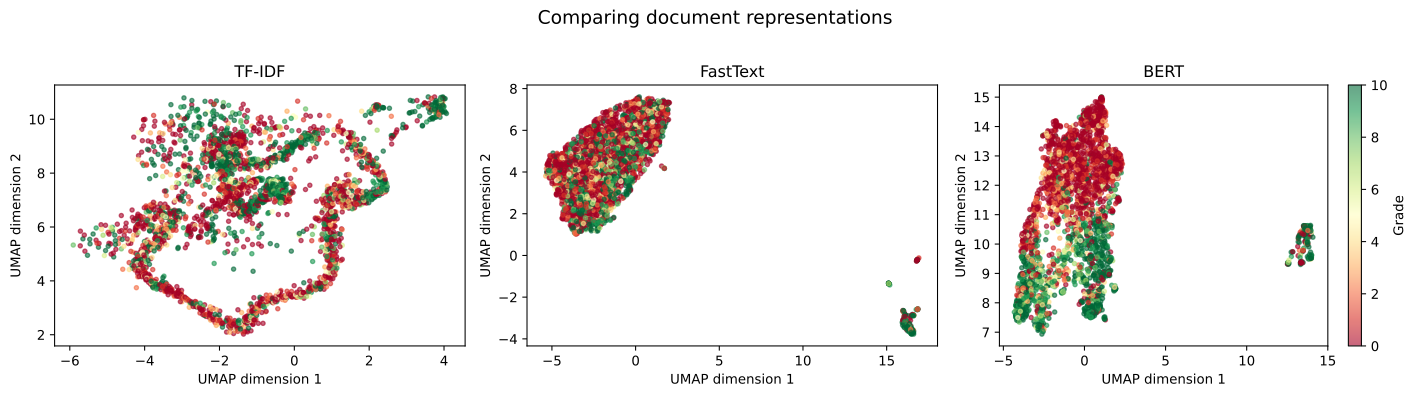
3.4 Comparing three representations

Now we have three ways to represent the same documents:

  • TF-IDF: 1,000 dimensions (word frequencies)
  • FastText: 300 dimensions (averaged word vectors)
  • BERT: 384 dimensions (context-aware document vectors)

Let’s visualize all three with UMAP and compare.

# UMAP projection of BERT embeddings
bert_embedding_2d = reducer.fit_transform(bert_embeddings)

# Add to dataframe
reviews['bert_umap_x'] = bert_embedding_2d[:, 0]
reviews['bert_umap_y'] = bert_embedding_2d[:, 1]
# First: Static overview for direct visual comparison
fig, axes = plt.subplots(1, 3, figsize=(15, 4))

# Plot 1: TF-IDF
scatter1 = axes[0].scatter(reviews['umap_x'], reviews['umap_y'], 
                          c=reviews['grade'], cmap='RdYlGn', 
                          s=10, alpha=0.6, vmin=0, vmax=10)
axes[0].set_xlabel('UMAP dimension 1')
axes[0].set_ylabel('UMAP dimension 2')
axes[0].set_title('TF-IDF')

# Plot 2: FastText
scatter2 = axes[1].scatter(reviews['ft_umap_x'], reviews['ft_umap_y'], 
                          c=reviews['grade'], cmap='RdYlGn', 
                          s=10, alpha=0.6, vmin=0, vmax=10)
axes[1].set_xlabel('UMAP dimension 1')
axes[1].set_ylabel('UMAP dimension 2')
axes[1].set_title('FastText')

# Plot 3: BERT (with colorbar)
scatter3 = axes[2].scatter(reviews['bert_umap_x'], reviews['bert_umap_y'], 
                          c=reviews['grade'], cmap='RdYlGn', 
                          s=10, alpha=0.6, vmin=0, vmax=10)
axes[2].set_xlabel('UMAP dimension 1')
axes[2].set_ylabel('UMAP dimension 2')
axes[2].set_title('BERT')

# Add colorbar to the rightmost plot
cbar = plt.colorbar(scatter3, ax=axes[2])
cbar.set_label('Grade')

plt.suptitle('Comparing document representations', fontsize=14, y=1.02)
plt.tight_layout()
plt.show()

Observation: Which representation shows the clearest separation between positive (green) and negative (red) reviews?

Now, explore each representation interactively. Hover over points to read review text and discover which reviews cluster together.

3.4.1 TF-IDF representation (interactive)

import plotly.express as px

fig = px.scatter(reviews, 
                 x='umap_x', 
                 y='umap_y',
                 color='grade',
                 hover_data={'text_wrapped': True,
                             'grade': True,
                             'umap_x': False,
                             'umap_y': False},
                 color_continuous_scale='RdYlGn',
                 labels={'umap_x': 'UMAP dimension 1',
                         'umap_y': 'UMAP dimension 2',
                         'text_wrapped': 'Review'},
                 title='TF-IDF embeddings (interactive exploration)')
fig.update_traces(marker=dict(size=5, opacity=0.6))
fig.update_layout(height=600, width=900, hoverlabel=dict(align="left"))
fig.show()

3.4.2 FastText representation (interactive)

fig = px.scatter(reviews, 
                 x='ft_umap_x', 
                 y='ft_umap_y',
                 color='grade',
                 hover_data={'text_wrapped': True,
                             'grade': True,
                             'ft_umap_x': False,
                             'ft_umap_y': False},
                 color_continuous_scale='RdYlGn',
                 labels={'ft_umap_x': 'UMAP dimension 1',
                         'ft_umap_y': 'UMAP dimension 2',
                         'text_wrapped': 'Review'},
                 title='FastText embeddings (interactive exploration)')
fig.update_traces(marker=dict(size=5, opacity=0.6))
fig.update_layout(height=600, width=900, hoverlabel=dict(align="left"))
fig.show()

3.4.3 BERT representation (interactive)

fig = px.scatter(reviews, 
                 x='bert_umap_x', 
                 y='bert_umap_y',
                 color='grade',
                 hover_data={'text_wrapped': True,
                             'grade': True,
                             'bert_umap_x': False,
                             'bert_umap_y': False},
                 color_continuous_scale='RdYlGn',
                 labels={'bert_umap_x': 'UMAP dimension 1',
                         'bert_umap_y': 'UMAP dimension 2',
                         'text_wrapped': 'Review'},
                 title='BERT embeddings (interactive exploration)')
fig.update_traces(marker=dict(size=5, opacity=0.6))
fig.update_layout(height=600, width=900, hoverlabel=dict(align="left"))
fig.show()

Compare across representations: Do semantically similar reviews cluster together? How does this differ between TF-IDF, FastText, and BERT?

3.5 What does each representation capture?

  • TF-IDF: Keyword matching. Reviews cluster if they use the same words.
  • FastText: Semantic similarity. Reviews cluster if they discuss related concepts (even with different words).
  • BERT: Context-aware meaning. Reviews cluster if they express similar sentiments or themes, accounting for word order and context.

For the Animal Crossing reviews, BERT likely performs best because it captures:

  • Negation: “not fun” vs “fun”
  • Sentiment: Positive vs negative tone
  • Nuanced meaning: Gameplay mechanics vs social features vs aesthetics

4 Clustering with different representations

Now we apply clustering to discover thematic patterns in the reviews. We use the same algorithm (hierarchical clustering) but with different inputs (TF-IDF, FastText, BERT) to see how representation affects discovered patterns.

4.1 The clustering task

Research question: What themes emerge in Animal Crossing reviews?

We do not know in advance how many themes exist or what they are. Clustering is an exploratory technique to discover structure in data.

Method: Hierarchical clustering

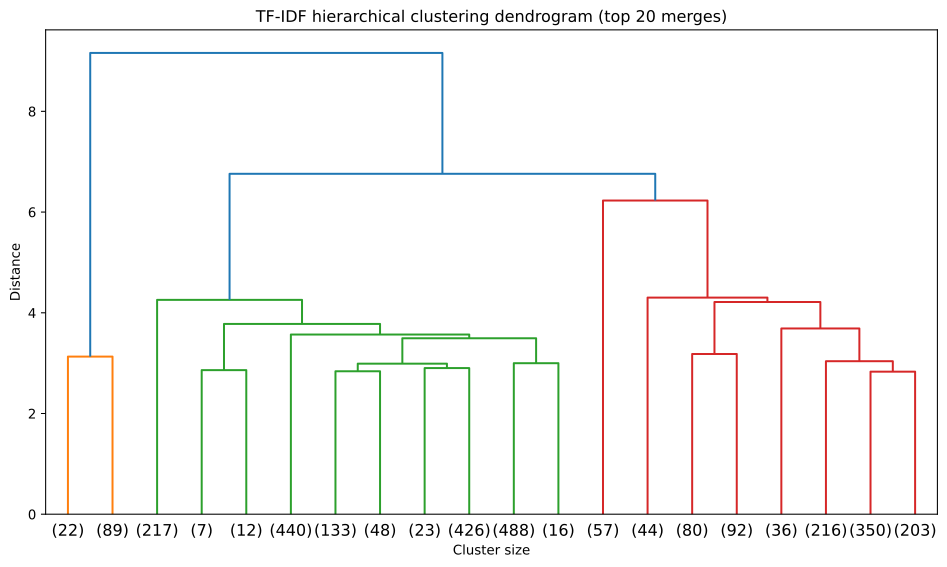
Hierarchical clustering builds a tree (dendrogram) by:

  1. Start: each review is its own cluster (2,999 clusters)
  2. Repeat: merge the two most similar clusters
  3. End: all reviews in one cluster

We then “cut” the tree at a certain level to get our final clusters. Cutting higher gives fewer large clusters; cutting lower gives many small clusters.

Linkage method: Ward

Ward linkage merges clusters to minimize within-cluster variance. This tends to create compact, well-separated clusters and performs well on text data.

NoteClustering in high dimensions

Clustering operates in the original high-dimensional space (1,000 or 300 or 384 dimensions). UMAP is just a 2D projection for our eyes - the algorithm “sees” the full complexity.

This is important: the 2D plot may show overlap, but clusters might be well-separated in the full space.

4.2 Clustering TF-IDF representations

from sklearn.cluster import AgglomerativeClustering
from scipy.cluster.hierarchy import dendrogram, linkage

# Compute linkage matrix
linkage_matrix = linkage(tfidf_matrix.toarray(), method='ward')

# Plot dendrogram
plt.figure(figsize=(10, 6))
dendrogram(linkage_matrix, truncate_mode='lastp', p=20)
plt.title('TF-IDF hierarchical clustering dendrogram (top 20 merges)')
plt.xlabel('Cluster size')
plt.ylabel('Distance')
plt.tight_layout()
plt.show()

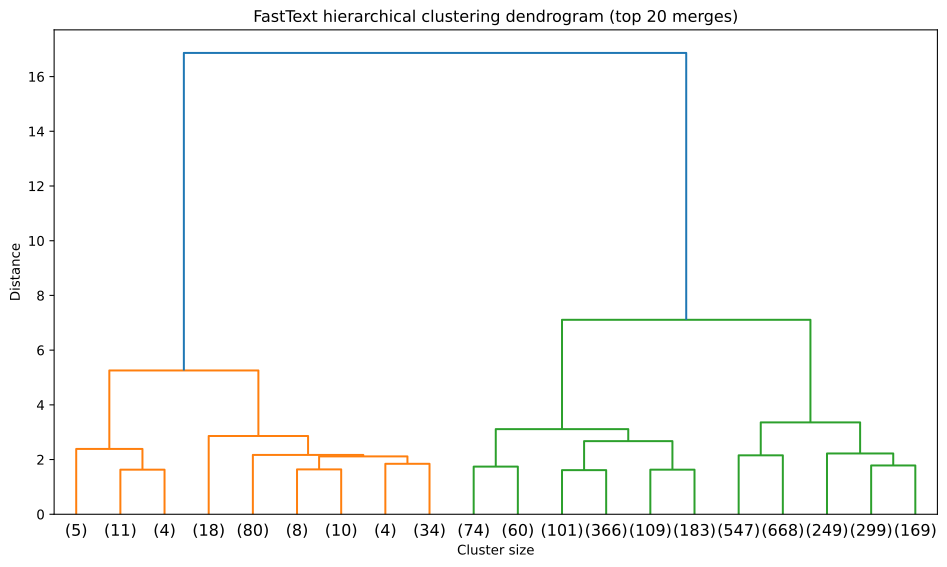
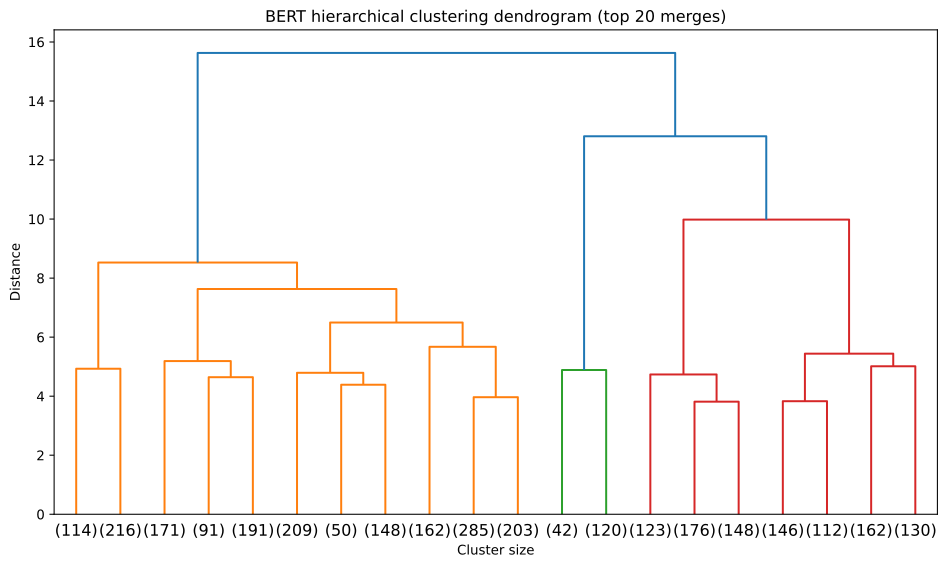
Reading the dendrogram: The tree shows how clusters merge hierarchically. Height (y-axis) indicates dissimilarity - tall vertical lines mean merging very different clusters. Each leaf node represents a cluster of reviews (the number in parentheses shows how many reviews it contains).

Why truncate? With ~3,000 reviews, showing all merges creates an unreadable plot. Setting truncate_mode='lastp', p=20 shows only the final 20 merge operations - the last steps before everything becomes one cluster. This reveals the high-level structure without overwhelming detail.

# Cut tree to get 5 clusters
# We choose 5 arbitrarily for this demo. In a real analysis, 
# you would explore different numbers or use the methods in Lab 07.2.
n_clusters = 5

clustering = AgglomerativeClustering(n_clusters=n_clusters, linkage='ward')
tfidf_labels = clustering.fit_predict(tfidf_matrix.toarray())

# Add labels to dataframe
reviews['tfidf_cluster'] = tfidf_labels

# Show cluster sizes
print("TF-IDF cluster sizes:")
print(reviews['tfidf_cluster'].value_counts().sort_index())
TF-IDF cluster sizes:
tfidf_cluster
0    1810
1     111
2     977
3      57
4      44
Name: count, dtype: int64

4.3 Clustering FastText embeddings

from sklearn.preprocessing import normalize

# Normalize embeddings (important for Euclidean distance/Ward linkage)
# This focuses on semantic direction rather than vector magnitude
ft_matrix_norm = normalize(ft_matrix)

# Compute linkage matrix
ft_linkage_matrix = linkage(ft_matrix_norm, method='ward')

# Plot dendrogram
plt.figure(figsize=(10, 6))
dendrogram(ft_linkage_matrix, truncate_mode='lastp', p=20)
plt.title('FastText hierarchical clustering dendrogram (top 20 merges)')
plt.xlabel('Cluster size')
plt.ylabel('Distance')
plt.tight_layout()
plt.show()

# Get cluster labels
# We use the normalized matrix to match the linkage calculation
ft_clustering = AgglomerativeClustering(n_clusters=n_clusters, linkage='ward')
reviews['fasttext_cluster'] = ft_clustering.fit_predict(ft_matrix_norm)

# Show cluster sizes
print("FastText cluster sizes:")
print(reviews['fasttext_cluster'].value_counts().sort_index())
FastText cluster sizes:
fasttext_cluster
0     893
1     154
2     717
3      20
4    1215
Name: count, dtype: int64

4.4 Clustering BERT embeddings

# Normalize embeddings
bert_embeddings_norm = normalize(bert_embeddings)

# Compute linkage matrix
bert_linkage_matrix = linkage(bert_embeddings_norm, method='ward')

# Plot dendrogram
plt.figure(figsize=(10, 6))
dendrogram(bert_linkage_matrix, truncate_mode='lastp', p=20)
plt.title('BERT hierarchical clustering dendrogram (top 20 merges)')
plt.xlabel('Cluster size')
plt.ylabel('Distance')
plt.tight_layout()
plt.show()

# Get cluster labels
bert_clustering = AgglomerativeClustering(n_clusters=n_clusters, linkage='ward')
reviews['bert_cluster'] = bert_clustering.fit_predict(bert_embeddings_norm)

# Show cluster sizes
print("BERT cluster sizes:")
print(reviews['bert_cluster'].value_counts().sort_index())
BERT cluster sizes:
bert_cluster
0    1510
1     550
2     162
3     447
4     330
Name: count, dtype: int64

4.5 Visualizing clusters in UMAP space

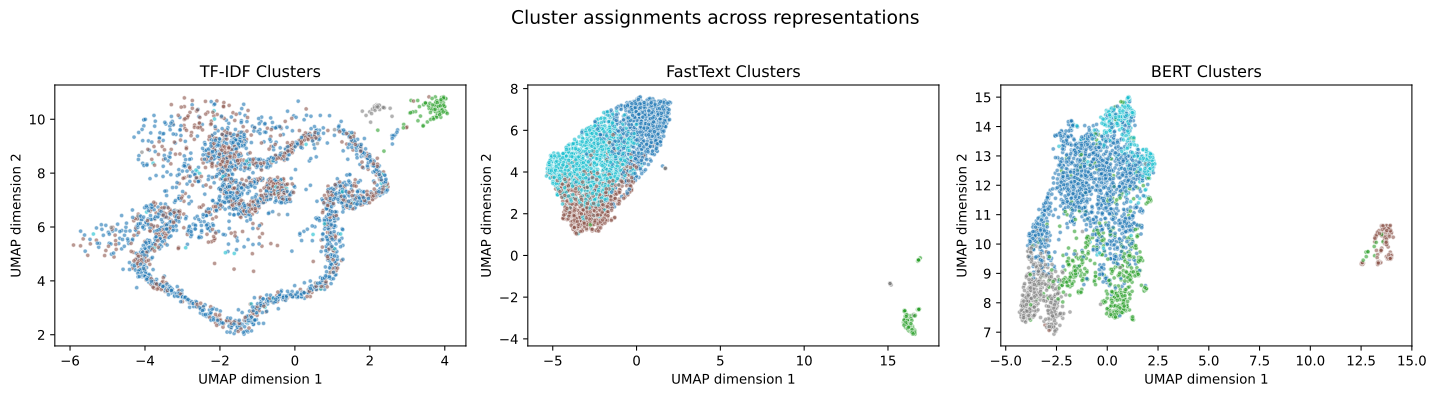
Now we color the UMAP plots by cluster assignment (not grade). This shows how well clusters separate in the 2D projection.

First, a static overview comparing all three representations:

# Static three-panel comparison
fig, axes = plt.subplots(1, 3, figsize=(15, 4))

# Plot 1: TF-IDF clusters
scatter1 = axes[0].scatter(reviews['umap_x'], reviews['umap_y'], 
                          c=reviews['tfidf_cluster'], cmap='tab10', 
                          s=10, alpha=0.6, edgecolors='white', linewidths=0.5)
axes[0].set_xlabel('UMAP dimension 1')
axes[0].set_ylabel('UMAP dimension 2')
axes[0].set_title('TF-IDF Clusters')

# Plot 2: FastText clusters
scatter2 = axes[1].scatter(reviews['ft_umap_x'], reviews['ft_umap_y'], 
                          c=reviews['fasttext_cluster'], cmap='tab10', 
                          s=10, alpha=0.6, edgecolors='white', linewidths=0.5)
axes[1].set_xlabel('UMAP dimension 1')
axes[1].set_ylabel('UMAP dimension 2')
axes[1].set_title('FastText Clusters')

# Plot 3: BERT clusters
scatter3 = axes[2].scatter(reviews['bert_umap_x'], reviews['bert_umap_y'], 
                          c=reviews['bert_cluster'], cmap='tab10', 
                          s=10, alpha=0.6, edgecolors='white', linewidths=0.5)
axes[2].set_xlabel('UMAP dimension 1')
axes[2].set_ylabel('UMAP dimension 2')
axes[2].set_title('BERT Clusters')

plt.suptitle('Cluster assignments across representations', fontsize=14, y=1.02)
plt.tight_layout()
plt.show()

Observation: Do clusters appear well-separated in 2D space? Remember, separation in 2D is only approximate - the real clustering happens in high dimensions.

Now, explore each representation interactively. The legend allows you to toggle cluster visibility - click cluster names to hide/show them.

4.5.1 TF-IDF clusters (interactive)

import plotly.express as px

fig = px.scatter(reviews, 
                 x='umap_x', 
                 y='umap_y',
                 color=reviews['tfidf_cluster'].astype(str),
                 hover_data={'text_wrapped': True,
                             'grade': True,
                             'umap_x': False,
                             'umap_y': False},
                 labels={'color': 'Cluster',
                         'umap_x': 'UMAP dimension 1',
                         'umap_y': 'UMAP dimension 2',
                         'text_wrapped': 'Review'},
                 title='TF-IDF clusters (interactive exploration)')
fig.update_traces(marker=dict(size=5, opacity=0.6))
fig.update_layout(height=600, width=900, hoverlabel=dict(align="left"))
fig.show()

4.5.2 FastText clusters (interactive)

fig = px.scatter(reviews, 
                 x='ft_umap_x', 
                 y='ft_umap_y',
                 color=reviews['fasttext_cluster'].astype(str),
                 hover_data={'text_wrapped': True,
                             'grade': True,
                             'ft_umap_x': False,
                             'ft_umap_y': False},
                 labels={'color': 'Cluster',
                         'ft_umap_x': 'UMAP dimension 1',
                         'ft_umap_y': 'UMAP dimension 2',
                         'text_wrapped': 'Review'},
                 title='FastText clusters (interactive exploration)')
fig.update_traces(marker=dict(size=5, opacity=0.6))
fig.update_layout(height=600, width=900, hoverlabel=dict(align="left"))
fig.show()

4.5.3 BERT clusters (interactive)

fig = px.scatter(reviews, 
                 x='bert_umap_x', 
                 y='bert_umap_y',
                 color=reviews['bert_cluster'].astype(str),
                 hover_data={'text_wrapped': True,
                             'grade': True,
                             'bert_umap_x': False,
                             'bert_umap_y': False},
                 labels={'color': 'Cluster',
                         'bert_umap_x': 'UMAP dimension 1',
                         'bert_umap_y': 'UMAP dimension 2',
                         'text_wrapped': 'Review'},
                 title='BERT clusters (interactive exploration)')
fig.update_traces(marker=dict(size=5, opacity=0.6))
fig.update_layout(height=600, width=900, hoverlabel=dict(align="left"))
fig.show()

Explore: Hover over points to read reviews. Click legend items to focus on specific clusters. Do reviews in the same cluster seem thematically related?

5 Interpreting clusters

We have assigned each review to a cluster, but what do these clusters represent? Without ground truth labels (unlike supervised learning), interpretation IS validation.

5.1 What makes a cluster interpretable?

Good clusters have three properties:

  • Coherence: Reviews within a cluster discuss similar themes
  • Distinctiveness: Different clusters capture different themes
  • Usefulness: We can understand and name what each cluster represents

We use three methods to interpret clusters: top words, representative examples, and grade distributions.

5.2 Top words per cluster

For each cluster, we compute TF-IDF treating the entire cluster as a single document. This reveals words that characterize each cluster.

ImportantWhy are we filtering stop words now?

In previous labs, we removed stop words (like “the”, “and”) and domain-specific words (like “game”) before analysis. Why didn’t we do that here?

Reason 1: Context matters for embeddings. BERT and FastText rely on sentence structure to understand meaning. The sentence “I like the game” is easier for BERT to understand than “like game”. Removing words breaks the context these models need.

Reason 2: Models vs Humans. The clustering algorithms can “see past” the frequent words to find the underlying structure. But when we try to interpret the clusters, seeing “game” at the top of every list is unhelpful.

Therefore, we apply aggressive filtering only at the interpretation stage, after the modeling is done.

from sklearn.feature_extraction.text import TfidfVectorizer

def get_top_words_per_cluster(texts, labels, n_words=15, additional_stop_words=None):
    """
    Extract distinctive words for each cluster using Class-based TF-IDF.
    
    Instead of standard TF-IDF (documents = reviews), we treat 
    each CLUSTER as a document.
    
    TF: Frequency of word in this cluster
    IDF: Inverse frequency of word across ALL clusters
    
    Result: Words that are frequent in this cluster but rare in others.
    """
    # Create a dataframe to group texts
    df = pd.DataFrame({'text': texts, 'cluster': labels})
    
    # Concatenate all texts within each cluster to form "cluster documents"
    cluster_docs = df.groupby('cluster')['text'].apply(' '.join)
    
    # Define stop words
    from sklearn.feature_extraction import text
    stop_words = list(text.ENGLISH_STOP_WORDS)
    if additional_stop_words:
        stop_words.extend(additional_stop_words)
    
    # Compute TF-IDF across these cluster documents
    # This penalizes words that appear in ALL clusters (like "game")
    vectorizer = TfidfVectorizer(max_features=None, stop_words=stop_words)
    tfidf_matrix = vectorizer.fit_transform(cluster_docs)
    
    feature_names = vectorizer.get_feature_names_out()
    results = {}
    
    for i, cluster_id in enumerate(cluster_docs.index):
        # Get score row for this cluster
        scores = tfidf_matrix[i].toarray().flatten()
        
        # Get indices of top scores
        top_indices = scores.argsort()[-n_words:][::-1]
        
        # Get corresponding words
        top_words = [feature_names[j] for j in top_indices]
        results[cluster_id] = top_words
    
    return results

Let’s examine BERT clusters (generally the best representation):

# Get top words for each BERT cluster
# We filter out generic words to find distinctive themes
bert_top_words = get_top_words_per_cluster(
    reviews['text'], 
    reviews['bert_cluster'],
    additional_stop_words=['game', 'island', 'play', 'playing', 'player', 
                          'nintendo', 'switch', 'console', 'just', 'like', 'really',
                          'expand', 'people', 'experience', 'don', 'want', 'buy',
                          'time', 'new', 'crossing', 'animal', 'review', 'second',
                          'person', 'games']
)

# Display
print("Top words per BERT cluster:\n")
for cluster_id, words in bert_top_words.items():
    cluster_size = (reviews['bert_cluster'] == cluster_id).sum()
    print(f"Cluster {cluster_id} ({cluster_size} reviews):")
    print(f"  {', '.join(words)}")
    print()
Top words per BERT cluster:

Cluster 0 (1510 reviews):
  make, players, progress, multiplayer, family, fun, multiple, share, way, great, bought, islands, enjoy, able, account

Cluster 1 (550 reviews):
  fun, day, things, great, 10, good, ve, make, way, crafting, series, lot, love, best, relaxing

Cluster 2 (162 reviews):
  que, la, el, juego, es, para, en, una, le, por, los, se, lo, muy, como

Cluster 3 (447 reviews):
  horizons, series, fun, great, best, played, things, ve, make, multiplayer, amazing, lot, day, love, good

Cluster 4 (330 reviews):
  multiple, islands, family, share, good, bought, fact, fix, greedy, make, user, account, way, kids, decision

Interpretation: Do these word lists suggest coherent themes? Can you give each cluster a descriptive name?

5.3 Representative reviews from each cluster

Top words are useful, but reading actual reviews provides deeper understanding. We find reviews closest to each cluster’s centroid (center point).

from sklearn.metrics.pairwise import cosine_similarity

def get_representative_reviews(embeddings, labels, texts, n_examples=3):
    """
    Find reviews closest to cluster centroids.
    
    For each cluster:
    1. Compute centroid (average embedding)
    2. Find reviews with highest cosine similarity to centroid
    """
    results = {}
    
    for cluster_id in sorted(np.unique(labels)):
        # Get embeddings for this cluster
        cluster_mask = labels == cluster_id
        cluster_embeddings = embeddings[cluster_mask]
        cluster_texts = texts[cluster_mask]
        
        # Compute centroid
        centroid = cluster_embeddings.mean(axis=0, keepdims=True)
        
        # Find closest reviews
        similarities = cosine_similarity(cluster_embeddings, centroid).flatten()
        top_indices = similarities.argsort()[-n_examples:][::-1]
        
        results[cluster_id] = cluster_texts.iloc[top_indices].tolist()
    
    return results
# Get representative reviews for BERT clusters
# We use normalized embeddings to be consistent with the clustering
bert_examples = get_representative_reviews(
    bert_embeddings_norm, 
    reviews['bert_cluster'].values,
    reviews['text'],
    n_examples=2
)

# Display
print("Representative reviews per BERT cluster:\n")
for cluster_id, examples in bert_examples.items():
    cluster_size = (reviews['bert_cluster'] == cluster_id).sum()
    print(f"Cluster {cluster_id} ({cluster_size} reviews):")
    for i, example in enumerate(examples, 1):
        # Show first 200 characters
        print(f"  {i}. {example[:200]}...")
    print()
Representative reviews per BERT cluster:

Cluster 0 (1510 reviews):
  1. My wife and I were soooo looking forward to playing this game, and when she started I thought it was great. But when I went to start my own game and realized I couldn't have my own island, also that m...
  2. The game is great if you plan on playing alone. There are no multiple save files to support multiple islands which creates a huge problem. Do not buy this game if you have multiple people who are inte...

Cluster 1 (550 reviews):
  1. This game is amazing and i am personally sick of this review bombing nonsense it is an incredible game and very relaxing for me personally I highly recommend you go out and buy it...
  2. Absolutely wonderful game with fun stuff to do.  Great for relaxing,  customizing and learning new things. Take it a day at a time with this one....

Cluster 2 (162 reviews):
  1. Un juego excelente,lleno de detalles,de cosas por hacer,algo sumamente adictivo por el cual a veces juegas horas y horas sin parar,sin duda uno de los mejores juegos de la decada,un excelente trabajo ...
  2. Compre el juego para jugar con mi novio, resulta que solo el usuario principal disfruta de todo y hace crecer la isla. Me parece una estafa gigante. Estoy muy disconforme con la compra....

Cluster 3 (447 reviews):
  1. The game is a wonderful, peaceful, and adorable masterpiece that is probably the best of all previous animal crossing games. Although I was initially distressed at the shared island for multiple users...
  2. Probably the best animal crossing game to date. Great for all-time players and new ones alike. The wait for the game was worth it, as it shows a leap from previous entries. It has good online play and...

Cluster 4 (330 reviews):
  1. One island per switch its so sad to play, it should've been limited to 3 islands per console at least or something like that so most members of a family can enjoy the game properly. Not everybody can ...
  2. 1 island per console breaks the game. The switch is supposed to be a home console shared by the household. This is a terrible experience. No one should have to spend another $300 on an additional swit...

Interpretation: Reading these examples, can you identify themes for each cluster? Do the reviews within each cluster feel cohesive?

5.4 Grade distributions by cluster

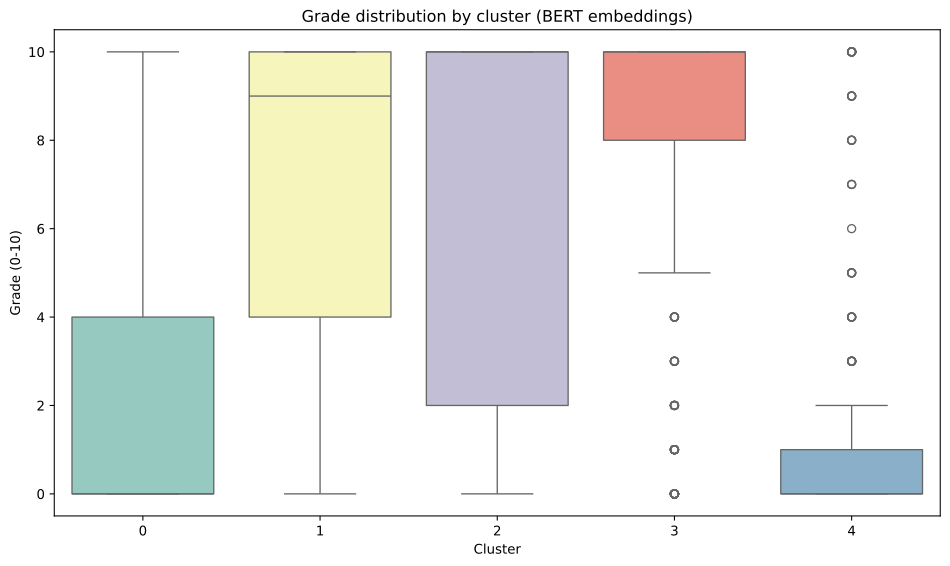
Do some clusters contain primarily positive reviews while others contain negative reviews? This would suggest sentiment-based clustering.

# Box plot of grades by cluster
plt.figure(figsize=(10, 6))
sns.boxplot(data=reviews, x='bert_cluster', y='grade', palette='Set3')
plt.xlabel('Cluster')
plt.ylabel('Grade (0-10)')
plt.title('Grade distribution by cluster (BERT embeddings)')
plt.tight_layout()
plt.show()
/tmp/ipykernel_3278909/1343480356.py:3: FutureWarning:


Passing `palette` without assigning `hue` is deprecated and will be removed in v0.14.0. Assign the `x` variable to `hue` and set `legend=False` for the same effect.

# Mean grade per cluster
print("Mean grade per BERT cluster:\n")
for cluster_id in sorted(reviews['bert_cluster'].unique()):
    cluster_data = reviews[reviews['bert_cluster'] == cluster_id]
    mean_grade = cluster_data['grade'].mean()
    std_grade = cluster_data['grade'].std()
    print(f"Cluster {cluster_id}: {mean_grade:.2f} ± {std_grade:.2f}")
Mean grade per BERT cluster:

Cluster 0: 2.49 ± 3.57
Cluster 1: 7.03 ± 3.89
Cluster 2: 6.89 ± 4.18
Cluster 3: 7.92 ± 3.32
Cluster 4: 1.11 ± 2.54

Observation: Are clusters primarily defined by sentiment (positive vs negative), or do they capture other dimensions (gameplay vs story, casual vs hardcore)?

5.5 Choosing the number of clusters

So far, we arbitrarily chose k=5 clusters. But how many clusters actually exist in this data? This question parallels the topic number selection problem from Lab 06.

5.5.1 Connection to topic modeling

Recall from Lab 06 that choosing the number of topics required:

  1. Iterative exploration: Try different values (k=5, 10, 15, 20)
  2. Interpretability assessment: Can you name each topic? Are top words coherent?
  3. Stability evaluation: Are topics consistent across bootstrap samples?
  4. No single correct answer: The “right” number depends on your analytical goals and desired granularity

Clustering faces the same challenges. The key difference: topic modeling uses soft assignment (documents can belong to multiple topics), while clustering uses hard assignment (each document belongs to exactly one cluster).

5.5.2 Exploring different values of k

Let’s cluster the BERT embeddings with k=3, 5, 7, and 10 to see how interpretability changes:

from sklearn.cluster import AgglomerativeClustering

# Try different numbers of clusters
k_values = [3, 5, 7, 10]
clustering_results = {}

for k in k_values:
    clustering = AgglomerativeClustering(n_clusters=k, linkage='ward')
    labels = clustering.fit_predict(bert_embeddings_norm)
    clustering_results[k] = labels
    
    # Show cluster sizes
    cluster_counts = pd.Series(labels).value_counts().sort_index()
    print(f"\nk={k} cluster sizes:")
    print(cluster_counts.to_dict())

k=3 cluster sizes:
{0: 997, 1: 1840, 2: 162}

k=5 cluster sizes:
{0: 1510, 1: 550, 2: 162, 3: 447, 4: 330}

k=7 cluster sizes:
{0: 650, 1: 550, 2: 453, 3: 447, 4: 330, 5: 162, 6: 407}

k=10 cluster sizes:
{0: 292, 1: 330, 2: 162, 3: 447, 4: 488, 5: 282, 6: 407, 7: 162, 8: 258, 9: 171}

Observation: Notice how cluster sizes change with k. Larger k creates more fine-grained distinctions, smaller k creates broader categories.

5.5.3 Comparing interpretability across k values

For each k, let’s examine the top words to assess interpretability:

# Get top words for each k value
print("Top words per cluster for different k values:\n")

for k in k_values:
    print(f"{'='*80}")
    print(f"k={k} clusters")
    print(f"{'='*80}\n")
    
    top_words = get_top_words_per_cluster(
        reviews['text'], 
        clustering_results[k],
        n_words=10,
        additional_stop_words=['game', 'island', 'play', 'playing', 'player', 
                              'nintendo', 'switch', 'console', 'just', 'like', 'really',
                              'expand', 'people', 'experience', 'don', 'want', 'buy',
                              'time', 'new', 'crossing', 'animal', 'review', 'second',
                              'person', 'games']
    )
    
    for cluster_id, words in top_words.items():
        cluster_size = (clustering_results[k] == cluster_id).sum()
        print(
            f"Cluster {cluster_id} ({cluster_size} reviews): {', '.join(words[:8])}"
        )
    print()
Top words per cluster for different k values:

================================================================================
k=3 clusters
================================================================================

Cluster 0 (997 reviews): fun, great, series, things, day, make, ve, played
Cluster 1 (1840 reviews): make, progress, players, family, multiple, multiplayer, fun, share
Cluster 2 (162 reviews): que, la, el, juego, es, en, una, para

================================================================================
k=5 clusters
================================================================================

Cluster 0 (1510 reviews): make, players, progress, multiplayer, family, fun, multiple, share
Cluster 1 (550 reviews): fun, day, things, great, 10, good, ve, make
Cluster 2 (162 reviews): que, la, el, juego, es, para, en, una
Cluster 3 (447 reviews): horizons, series, fun, great, best, played, things, ve
Cluster 4 (330 reviews): multiple, islands, family, share, good, bought, fact, fix

================================================================================
k=7 clusters
================================================================================

Cluster 0 (650 reviews): make, family, progress, players, share, multiple, way, fun
Cluster 1 (550 reviews): fun, day, things, great, 10, good, ve, make
Cluster 2 (453 reviews): multiplayer, save, players, multiple, family, progress, bought, money
Cluster 3 (447 reviews): horizons, series, fun, great, best, played, things, ve
Cluster 4 (330 reviews): multiple, islands, family, share, good, bought, fix, fact
Cluster 5 (162 reviews): que, la, el, es, juego, en, para, una
Cluster 6 (407 reviews): fun, great, 10, progress, players, multiplayer, way, ac

================================================================================
k=10 clusters
================================================================================

Cluster 0 (292 reviews): fun, 10, great, best, bombing, love, relaxing, series
Cluster 1 (330 reviews): multiple, islands, family, share, good, bought, fact, greedy
Cluster 2 (162 reviews): que, la, el, es, juego, en, para, una
Cluster 3 (447 reviews): horizons, series, fun, great, best, played, things, ve
Cluster 4 (488 reviews): make, progress, players, family, share, multiple, multiplayer, way
Cluster 5 (282 reviews): save, multiple, share, money, file, players, bought, progress
Cluster 6 (407 reviews): fun, great, 10, progress, players, multiplayer, way, make
Cluster 7 (162 reviews): make, family, played, share, way, multiple, great, progress
Cluster 8 (258 reviews): things, day, fun, make, way, crafting, ve, items
Cluster 9 (171 reviews): multiplayer, family, players, progress, fun, bought, make, local
Interpretation questions:

  • k=3: Do the three clusters capture broad themes (e.g., positive/negative/mixed)?
  • k=5: Are themes more specific (e.g., gameplay complaints, social features, aesthetics)?
  • k=7: Can you still give each cluster a distinct, meaningful name?
  • k=10: Do some clusters become too narrow or redundant?

5.5.4 The exploration-granularity trade-off

Choosing k involves balancing:

Fewer clusters (k=3-5):

  • Broader, more interpretable themes
  • Higher within-cluster diversity
  • Some nuanced patterns get merged

More clusters (k=7-10):

  • Fine-grained distinctions
  • Risk of redundant or incoherent clusters
  • Harder to name each cluster meaningfully

Guidelines for choosing k:

  1. Can you name all clusters? If not, k might be too large
  2. Are clusters distinct? If multiple clusters seem identical, k is too large
  3. Are clusters too broad? If a cluster contains very different themes, k is too small
  4. Does it match your goal? Exploratory analysis may use smaller k; detailed analysis may need larger k

5.5.5 Soft vs hard assignment: when does it matter?

This exploration reveals a fundamental limitation of clustering compared to topic modeling:

Example review: “I love the cute graphics and relaxing music, but the gameplay gets repetitive fast.”

  • Topic modeling (Lab 06): Might assign 50% “positive aesthetics topic” + 50% “negative gameplay topic”
  • Clustering (Lab 07): Must assign to exactly ONE cluster (either “positive” or “negative” or “mixed”)

When hard assignment is problematic:

  • Documents discuss multiple themes (like the example review)
  • Themes are not mutually exclusive (aesthetics AND gameplay)
  • You need to quantify mixed sentiments

When hard assignment works well:

  • Documents focus on single themes
  • Clear categorization is needed (complaint type, primary topic)
  • Simplicity matters for downstream analysis

For review data where single documents often discuss multiple aspects, topic modeling’s soft assignment may be more appropriate than clustering’s hard assignment.

5.5.6 Stability and reproducibility

Just as topics should be stable across bootstrap samples (Lab 06), clusters should be stable across:

  1. Random initializations: K-means has random starts; do clusters remain consistent?
  2. Small data perturbations: If we remove 5% of reviews, do clusters remain similar?
  3. Parameter changes: Does changing linkage method (ward vs complete) drastically alter results?
NoteClustering stability metrics

Lab 07.2 (optional) covers formal stability assessment using:

  • Adjusted Rand Index (ARI): Measures agreement between two clusterings (0 = random, 1 = perfect)
  • Adjusted Mutual Information (AMI): Information-theoretic stability measure
  • Bootstrap validation: Cluster data repeatedly and measure consistency

These metrics help determine if discovered clusters reflect true structure or random variation.

5.5.7 Choosing k for our analysis

For the remainder of this lab, we continue with k=5 because:

  1. All five clusters can be given distinct, interpretable names
  2. Cluster sizes are reasonably balanced (no tiny clusters)
  3. It provides enough granularity to distinguish themes without overwhelming detail
  4. It matches the pedagogical goal: demonstrate interpretation workflow without excessive complexity

In your own analysis, you would iterate through different k values and choose based on interpretability and research goals.

5.6 A complete workflow: interpreting BERT clusters

Now let’s walk through a complete interpretation workflow using the BERT clusters, which typically provide the most semantically coherent results. This workflow combines all three interpretation methods using pandas DataFrames for clean, tabular analysis.

Step 1: Create cluster summary table

# Build comprehensive summary table
cluster_summary = []

for cluster_id in sorted(reviews['bert_cluster'].unique()):
    cluster_data = reviews[reviews['bert_cluster'] == cluster_id]
    
    cluster_summary.append({
        'Cluster': cluster_id,
        'Size': len(cluster_data),
        'Mean Grade': cluster_data['grade'].mean(),
        'Median Grade': cluster_data['grade'].median(),
        'Std Grade': cluster_data['grade'].std(),
        'Top Words': ', '.join(bert_top_words[cluster_id][:8])
    })

summary_df = pd.DataFrame(cluster_summary)
summary_df
Cluster Size Mean Grade Median Grade Std Grade Top Words
0 0 1510 2.492053 0.0 3.573650 make, players, progress, multiplayer, family, ...
1 1 550 7.025455 9.0 3.887218 fun, day, things, great, 10, good, ve, make
2 2 162 6.888889 10.0 4.182186 que, la, el, juego, es, para, en, una
3 3 447 7.919463 10.0 3.315645 horizons, series, fun, great, best, played, th...
4 4 330 1.106061 0.0 2.539229 multiple, islands, family, share, good, bought...

This table provides a high-level overview of each cluster’s characteristics.

Step 2: Examine grade distributions

# Create detailed grade distribution table
# Shows how many reviews of each grade (0-10) appear in each cluster
grade_dist = reviews.groupby(['bert_cluster', 'grade']).size().unstack(fill_value=0)

# Add row totals
grade_dist['Total'] = grade_dist.sum(axis=1)

grade_dist
grade 0 1 2 3 4 5 6 7 8 9 10 Total
bert_cluster
0 767 179 92 63 69 44 22 10 31 65 168 1510
1 81 21 17 14 20 17 11 9 29 69 262 550
2 31 7 4 4 3 3 2 3 1 19 85 162
3 39 14 9 7 7 9 8 9 26 95 224 447
4 240 34 9 10 6 5 1 3 4 5 13 330

Interpretation guide: Look for patterns in the grade distributions:

  • Clusters with high grades (8-10): Positive reviews
  • Clusters with low grades (0-2): Negative reviews
  • Clusters with bimodal distributions: May capture specific controversial features
  • Clusters with uniform distributions: May reflect non-sentiment themes

Step 3: Read representative examples

For deeper understanding, examine reviews closest to each cluster’s centroid:

# Get representative examples
bert_examples_extended = get_representative_reviews(
    bert_embeddings_norm, 
    reviews['bert_cluster'].values,
    reviews['text'],
    n_examples=3
)

# Display examples for each cluster
for cluster_id in sorted(reviews['bert_cluster'].unique()):
    cluster_size = (reviews['bert_cluster'] == cluster_id).sum()
    mean_grade = reviews[reviews['bert_cluster'] == cluster_id]['grade'].mean()
    
    print(
        f"\nCluster {cluster_id} ({cluster_size} reviews, mean grade: {mean_grade:.2f})"
    )
    print("=" * 80)
    
    for i, example in enumerate(bert_examples_extended[cluster_id], 1):
        # Show first 250 characters of each example
        print(f"{i}. {example[:250]}...")
        print()

Cluster 0 (1510 reviews, mean grade: 2.49)
================================================================================
1. My wife and I were soooo looking forward to playing this game, and when she started I thought it was great. But when I went to start my own game and realized I couldn't have my own island, also that my functions were limited on her island, the game w...

2. The game is great if you plan on playing alone. There are no multiple save files to support multiple islands which creates a huge problem. Do not buy this game if you have multiple people who are interested in playing. You all share an island and all...

3. I actually think this game is really amazing, addictive and all that jazz, but I can’t get behind the “one island per switch” and every player past player 1 is useless and can’t do anything to help the island or have fun in general. It’s just Nintend...


Cluster 1 (550 reviews, mean grade: 7.03)
================================================================================
1. This game is amazing and i am personally sick of this review bombing nonsense it is an incredible game and very relaxing for me personally I highly recommend you go out and buy it...

2. Absolutely wonderful game with fun stuff to do.  Great for relaxing,  customizing and learning new things. Take it a day at a time with this one....

3. Amazing game. So much fun stuff to do. Very well made, both for tv and handheld use. Easily worth the money. Considering how much fun is to be had, it makes sense they put in some restrictions. Not worth complaining about, you’ll still get hundreds o...


Cluster 2 (162 reviews, mean grade: 6.89)
================================================================================
1. Un juego excelente,lleno de detalles,de cosas por hacer,algo sumamente adictivo por el cual a veces juegas horas y horas sin parar,sin duda uno de los mejores juegos de la decada,un excelente trabajo de Nintendo,me encantò....

2. Compre el juego para jugar con mi novio, resulta que solo el usuario principal disfruta de todo y hace crecer la isla. Me parece una estafa gigante. Estoy muy disconforme con la compra....

3. Por este juego vale la pena comprarse una switch. Con lo que te dura el juego -infinito- y lo adictivo que es ,lo amortizas fijo. Tiene mucha personalidad. Está en el top de juegos de exclusivos switch. Pruébalo si nunca has jugado un Animal Crossing...


Cluster 3 (447 reviews, mean grade: 7.92)
================================================================================
1. The game is a wonderful, peaceful, and adorable masterpiece that is probably the best of all previous animal crossing games. Although I was initially distressed at the shared island for multiple users, now that I'm used to it it's actually a fun litt...

2. Probably the best animal crossing game to date. Great for all-time players and new ones alike. The wait for the game was worth it, as it shows a leap from previous entries. It has good online play and charming characters. New options to explore and f...

3. This is easily a contender for best Animal Crossing game. It brings everything you've loved about the series since it's beginnings, and adds even more content (with more to come). The only cons to this game are 1. a few quality of life changes they c...


Cluster 4 (330 reviews, mean grade: 1.11)
================================================================================
1. One island per switch its so sad to play, it should've been limited to 3 islands per console at least or something like that so most members of a family can enjoy the game properly. Not everybody can buy more than one switch....

2. 1 island per console breaks the game. The switch is supposed to be a home console shared by the household. This is a terrible experience. No one should have to spend another $300 on an additional switch to enjoy the game to its fullest with a partner...

3. Only one Island per console is a huge drawback for me. I expected more freedom from the series' debut on the Switch. I hope Nintendo solves this problem with a patch in the near future....

Step 4: Name the clusters

Based on the evidence (summary statistics, grade distributions, representative reviews), assign descriptive names:

# Create cluster names based on interpretation
# Modify these after examining the evidence above
cluster_names = {
    0: "Cluster 0 theme",
    1: "Cluster 1 theme", 
    2: "Cluster 2 theme",
    3: "Cluster 3 theme",
    4: "Cluster 4 theme"
}

# Add names to summary table
summary_df['Theme'] = summary_df['Cluster'].map(cluster_names)

# Reorder columns to put theme first
summary_df = summary_df[['Cluster', 'Theme', 'Size', 'Mean Grade', 'Median Grade', 'Std Grade', 'Top Words']]

summary_df
Cluster Theme Size Mean Grade Median Grade Std Grade Top Words
0 0 Cluster 0 theme 1510 2.492053 0.0 3.573650 make, players, progress, multiplayer, family, ...
1 1 Cluster 1 theme 550 7.025455 9.0 3.887218 fun, day, things, great, 10, good, ve, make
2 2 Cluster 2 theme 162 6.888889 10.0 4.182186 que, la, el, juego, es, para, en, una
3 3 Cluster 3 theme 447 7.919463 10.0 3.315645 horizons, series, fun, great, best, played, th...
4 4 Cluster 4 theme 330 1.106061 0.0 2.539229 multiple, islands, family, share, good, bought...

This workflow demonstrates the iterative process of cluster interpretation. You cycle between quantitative evidence (summary statistics, grade distributions) and qualitative understanding (reading representative examples) until a coherent narrative emerges for each cluster.

5.7 Comparing representations: what patterns do they find?

We’ve now clustered the same documents three different ways. Each representation discovers different patterns because each encodes text differently:

TF-IDF groups documents by explicit keyword overlap. Reviews cluster together when they use the same words. This is transparent (you can see exactly which words matter) but misses semantic similarity.

FastText groups documents by semantic relationships. Reviews cluster together when they discuss related concepts, even with different vocabulary. This captures synonymy (“amazing” ≈ “incredible”) but still treats each word with fixed meaning.

BERT groups documents by nuanced meaning. Reviews cluster together based on sentiment, context, and overall semantic content. This is the most sophisticated but least transparent approach.

Which should you use?

Goal Best Representation
Find reviews mentioning specific features TF-IDF (keyword matching)
Group by overall topic or theme FastText (semantic similarity)
Capture sentiment and nuanced meaning BERT (context-aware)
Transparent, explainable clusters TF-IDF or FastText
State-of-the-art performance BERT

For exploratory analysis of subjective text (like reviews), BERT often performs best. For analysis requiring transparency (showing stakeholders exactly why documents cluster), TF-IDF may be preferable.

Different representations, different insights: There is no single “correct” clustering. TF-IDF might group reviews by mentioned features (multiplayer, crafting, graphics), while BERT might group by emotional tone (enthusiastic, disappointed, ambivalent). Both are valid-they answer different questions.

5.8 Limitations of clustering

WarningClustering is exploratory, not confirmatory

Keep these limitations in mind:

  • No “correct” answer: There is no single right number of clusters or right clustering
  • Multiple valid interpretations: Different representations find different patterns (all may be valid)
  • Subjectivity: Interpretation depends on the analyst’s judgment
  • Hard assignment: Each review belongs to exactly one cluster, but reviews often discuss multiple themes

When clustering fails:

  • Cluster interpretations are vague (“this cluster is about… everything”)
  • Reviews in the same cluster seem unrelated
  • You cannot give clusters meaningful names

In these cases, consider:

  1. Different number of clusters (try 3, 7, or 10)
  2. Different representation (TF-IDF vs FastText vs BERT)
  3. Different method entirely (topic modeling allows soft assignment)

Connection to Lab 06: In topic modeling, documents can belong to multiple topics (soft assignment). In clustering, each document belongs to exactly one cluster (hard assignment). Which model better fits review data, where a review might discuss both gameplay AND story?

5.9 Next steps

Clustering is a tool for exploration, not a final answer. Discovered clusters can:

  • Guide qualitative analysis: Read reviews from each cluster to understand themes
  • Inform dictionary creation: Use top words to build domain - specific lexicons
  • Generate hypotheses: “Cluster 3 is positive reviews about social features” → test with targeted analysis
  • Create features: Use cluster membership as a predictor in other models

6 Conclusion

We explored three representations of the same documents:

  1. TF-IDF: Treats documents as bags of words, ignoring semantics and context
  2. FastText: Captures semantic relationships through word embeddings, but words have fixed meanings
  3. BERT: Context-aware embeddings that understand word order, negation, and varying word meanings

Applied to clustering Animal Crossing reviews, we found that representation fundamentally shapes discovered patterns. BERT generally produces more semantically coherent clusters, while TF-IDF may be more interpretable through keyword analysis.

Key takeaways:

  • Representation matters: How we encode text determines what patterns we can find
  • No single “best” representation: Choice depends on research goals and domain
  • Interpretation is validation: Without ground truth, understanding clusters IS the evaluation
  • Clustering is exploratory: Use it to discover patterns, generate hypotheses, and guide deeper analysis
NoteFor the curious: How FastText is trained

FastText uses the skipgram or CBOW (Continuous Bag of Words) architecture. The model learns by predicting context words from a target word (skipgram) or predicting a target word from context (CBOW).

Training process:

  1. Slide window over text: [the, quick, brown, fox, jumps]
  2. Task: predict “quick” and “fox” from “brown” (skipgram)
  3. Adjust vectors to improve predictions
  4. After millions of examples, similar words end up with similar vectors

FastText extends this by representing words as bags of character n-grams (by default, 3–6 characters). Boundary markers < and > distinguish prefixes and suffixes. For example, “where” becomes: <wh, whe, her, ere, re>, plus the whole word <where>. This allows handling unknown words and captures morphological relationships.

Learn more: Enriching Word Vectors with Subword Information