Document similarity, clustering, and temporal patterns
Published
2026-01-25 11:57:15
1 Learning objectives
By the end of this lab, you will understand:
How to represent documents as vectors in a shared space
What cosine similarity is and why it works for comparing texts
How TF-IDF weighting helps identify similar documents
How to create document similarity matrices and heatmaps
How to track linguistic change over time
How to identify periods of rhetorical innovation and stability
The difference between word-level and document-level analysis
2 Introduction: From words to documents
In Labs 01-03, we focused on analyzing individual words - counting them, comparing their frequencies, finding distinctive vocabulary with PMI. These are powerful techniques, but they all share one limitation: they treat each word independently.
But what if we want to ask questions like:
Which two presidential speeches are most similar overall?
Do speeches cluster by party, president, or historical era?
When did American political language change most dramatically?
Can we detect plagiarism or borrowed rhetoric?
These questions require us to think about entire documents, not just individual words. We need to compare whole texts and measure how similar or different they are.
2.1 The challenge: How do you compare documents?
Here’s the problem: Documents are long, complex objects. A State of the Union address might contain 5,000 words. How do we reduce all that complexity to a single number that tells us “these two speeches are similar”?
You might think: “Just count how many words they share!” But that doesn’t work well:
Example: Imagine three speeches:
Speech A: “We must strengthen our economy and create jobs for workers.”
Speech B: “We need to build our economy and provide employment for citizens.”
Speech C: “The weather today is sunny and warm.”
Speeches A and B share zero words in common (different vocabulary for the same ideas), but they’re clearly more similar than A and C (which happen to share “and” and “our”).
We need a smarter approach.
2.2 The solution: Vector space models
The key insight is this: If we represent each document as a vector (a list of numbers), we can use mathematical tools to measure how similar vectors are.
Here’s how it works:
Create a vocabulary: List all unique words across all documents
Count words in each document: For each document, count how many times each vocabulary word appears
Represent as vector: Each document becomes a vector where position i = count of word i
Measure similarity: Use mathematical distance or angle between vectors
This transforms the problem of comparing texts into the problem of comparing vectors - and we have excellent tools for that.
What we’ll build: By the end of this lab, you’ll be able to create a heatmap showing which presidential speeches are most similar to each other across 200+ years of American history. This reveals patterns invisible to word-level analysis.
3 Setup: Loading packages
# Data manipulationimport pandas as pdimport numpy as np# Text processingimport spacyfrom sklearn.feature_extraction.text import TfidfVectorizerfrom sklearn.metrics.pairwise import cosine_similarity# Visualizationimport matplotlib.pyplot as pltimport seaborn as sns# Set visualization stylesns.set_style("whitegrid")plt.rcParams['figure.figsize'] = (14, 8)print("✓ Packages loaded successfully")
✓ Packages loaded successfully
NoteAbout these packages
New packages in this lab:
sklearn (scikit-learn): Machine learning library with text processing tools
TfidfVectorizer: Converts text to TF-IDF weighted vectors
cosine_similarity: Measures similarity between vectors
numpy: Numerical computing for matrix operations
We continue using pandas, matplotlib, and seaborn from previous labs.
3.1 Loading spaCy model
# Load English language model for text processingnlp = spacy.load("en_core_web_sm")nlp.max_length =1530000# Increase limit for long documentsprint(f"✓ spaCy model loaded: {nlp.meta['name']}")
✓ spaCy model loaded: core_web_sm
4 Loading and preparing the data
Let’s load our familiar State of the Union dataset:
# Load the dataspeeches = pd.read_csv("data/transcripts.csv")speeches['date'] = pd.to_datetime(speeches['date'])speeches['year'] = speeches['date'].dt.yearprint(f"Total speeches: {len(speeches)}")print(f"Date range: {speeches['year'].min()} to {speeches['year'].max()}")print(f"\nFirst few rows:")speeches.head()
Total speeches: 244
Date range: 1790 to 2018

First few rows:
date
president
title
url
transcript
year
0
2018-01-30
Donald J. Trump
Address Before a Joint Session of the Congress...
https://www.cnn.com/2018/01/30/politics/2018-s...
\nMr. Speaker, Mr. Vice President, Members of ...
2018
1
2017-02-28
Donald J. Trump
Address Before a Joint Session of the Congress
http://www.presidency.ucsb.edu/ws/index.php?pi...
Thank you very much. Mr. Speaker, Mr. Vice Pre...
2017
2
2016-01-12
Barack Obama
Address Before a Joint Session of the Congress...
http://www.presidency.ucsb.edu/ws/index.php?pi...
Thank you. Mr. Speaker, Mr. Vice President, Me...
2016
3
2015-01-20
Barack Obama
Address Before a Joint Session of the Congress...
http://www.presidency.ucsb.edu/ws/index.php?pi...
The President. Mr. Speaker, Mr. Vice President...
2015
4
2014-01-28
Barack Obama
Address Before a Joint Session of the Congress...
http://www.presidency.ucsb.edu/ws/index.php?pi...
The President. Mr. Speaker, Mr. Vice President...
2014
4.1 Creating a working sample
To start, let’s work with a manageable subset - the 50 most recent speeches. This will help us understand the concepts before scaling up to the full dataset.
# Select 50 most recent speechesrecent_speeches = speeches.nlargest(50, 'year').copy()recent_speeches = recent_speeches.sort_values('year').reset_index(drop=True)print(f"Working with {len(recent_speeches)} speeches")print(f"Date range: {recent_speeches['year'].min()} to {recent_speeches['year'].max()}")print(f"\nPresidents included:")print(recent_speeches['president'].value_counts())
Working with 50 speeches
Date range: 1974 to 2018

Presidents included:
president
Ronald Reagan         8
George W. Bush        8
Barack Obama          8
William J. Clinton    8
Jimmy Carter          7
George Bush           4
Gerald R. Ford        3
Richard Nixon         2
Donald J. Trump       2
Name: count, dtype: int64
5 From text to vectors: The document-term matrix
5.1 What is a document-term matrix?
A document-term matrix (DTM) is a table where:
Each row represents one document
Each column represents one unique word (from the entire vocabulary)
Each cell contains the count of how many times that word appears in that document
Example: Imagine we have three tiny “speeches”:
Doc 1: “the economy is strong”
Doc 2: “the economy needs help”
Doc 3: “strong leadership helps”
The vocabulary is: {the, economy, is, strong, needs, help, leadership, helps}
The document-term matrix looks like:
the
economy
is
strong
needs
help
leadership
helps
Doc 1
1
1
1
1
0
0
0
0
Doc 2
1
1
0
0
1
1
0
0
Doc 3
0
0
0
1
0
0
1
1
Each row is a vector. Doc 1’s vector is [1, 1, 1, 1, 0, 0, 0, 0].
5.2 Creating a document-term matrix with scikit-learn
We’ll use scikit-learn’s CountVectorizer to create a DTM from our speeches. First, let’s do basic preprocessing:
from sklearn.feature_extraction.text import CountVectorizer# Create a simple document-term matrix# This counts word occurrences and removes very common/rare wordscount_vectorizer = CountVectorizer( max_features=1000, # Keep only top 1000 most frequent words stop_words='english', # Remove stop words min_df=2, # Word must appear in at least 2 documents lowercase=True# Convert to lowercase)# Fit and transform the speechesdtm_counts = count_vectorizer.fit_transform(recent_speeches['transcript'])# Get vocabulary (column names)vocab = count_vectorizer.get_feature_names_out()print(f"Document-term matrix shape: {dtm_counts.shape}")print(f" {dtm_counts.shape[0]} documents (speeches)")print(f" {dtm_counts.shape[1]} words (vocabulary)")print(f"\nFirst 20 words in vocabulary:")print(vocab[:20])
Document-term matrix shape: (50, 1000)
  50 documents (speeches)
  1000 words (vocabulary)

First 20 words in vocabulary:
['000' '10' '100' '12' '15' '1974' '1975' '1977' '1978' '1979' '1980'
 '1981' '20' '200' '21st' '25' '30' '40' '50' '500']
5.3 Inspecting the matrix
Let’s look at the word counts for one speech:
# Convert to dense array (from sparse matrix) for one documentdoc_idx =0# First speechword_counts = dtm_counts[doc_idx].toarray().flatten()# Create a DataFrame for easier viewingword_count_df = pd.DataFrame({'word': vocab,'count': word_counts}).sort_values('count', ascending=False)print(f"Top 20 words in speech from {recent_speeches.loc[doc_idx, 'year']}:")print(f"President: {recent_speeches.loc[doc_idx, 'president']}\n")print(word_count_df.head(20))
Top 20 words in speech from 1974:
President: Richard Nixon

          word  count
996      years     80
67     america     72
995       year     60
637      peace     54
993      world     52
601        new     44
639     people     44
68    american     42
189   congress     39
918       time     38
309     energy     34
863     states     32
397      great     32
550       make     30
51         ago     28
589     nation     26
947     united     24
920      today     24
671  president     23
69   americans     23
TipSparse matrices
The DTM is stored as a sparse matrix - a special data structure that only stores non-zero values. This is efficient because most cells in a DTM are zero (most words don’t appear in most documents).
For 50 documents × 1000 words = 50,000 cells, but maybe only 5,000 have non-zero counts. Sparse matrices save memory by only storing those 5,000 values.
6 The problem with raw counts
Raw word counts have a problem: They treat all words equally. But some words are more informative than others.
Consider two words:
“government”: Appears in 48 out of 50 speeches
“healthcare”: Appears in 15 out of 50 speeches
If a speech mentions “government” 10 times, that doesn’t tell us much - almost every speech talks about government! But if it mentions “healthcare” 10 times, that’s distinctive - this speech is really focusing on healthcare policy.
The insight: Words that appear in many documents are less useful for distinguishing documents than words that appear in few documents.
This is where TF-IDF comes in.
6.1 What is TF-IDF?
TF-IDF stands for Term Frequency - Inverse Document Frequency. It’s a weighting scheme that gives higher scores to words that are:
Frequent in the document (TF = Term Frequency)
Rare across the corpus (IDF = Inverse Document Frequency)
Think of it as a “distinctiveness score” for each word in each document.
How it works:
Term Frequency (TF): How many times does this word appear in this document?
Document Frequency (DF): In how many documents does this word appear?
Inverse Document Frequency (IDF): \(\log(\frac{\text{total documents}}{\text{document frequency}})\)
TF-IDF: \(\text{TF} \times \text{IDF}\)
Result:
Common words (appearing everywhere) get low IDF → low TF-IDF
Rare words (appearing in few documents) get high IDF → high TF-IDF (if they appear in this document)
Words appearing frequently in one document but rarely overall get highest TF-IDF
NoteA concrete example
Suppose we have 100 documents (speeches).
Word: “government”
Appears in 95 documents (very common)
IDF = log(100/95) = log(1.05) ≈ 0.05 (very low)
Even if it appears 20 times in one speech, TF-IDF ≈ 20 × 0.05 = 1.0
Word: “pandemic”
Appears in 5 documents (rare)
IDF = log(100/5) = log(20) ≈ 3.0 (high)
If it appears 20 times in one speech, TF-IDF ≈ 20 × 3.0 = 60.0
TF-IDF captures that “pandemic” is more distinctive for identifying what makes a document unique.
6.2 Creating TF-IDF weighted vectors
Let’s create TF-IDF vectors for our speeches:
from sklearn.feature_extraction.text import TfidfVectorizer# Create TF-IDF vectorizertfidf_vectorizer = TfidfVectorizer( max_features=1000, stop_words='english', min_df=2, lowercase=True)# Fit and transformtfidf_matrix = tfidf_vectorizer.fit_transform(recent_speeches['transcript'])tfidf_vocab = tfidf_vectorizer.get_feature_names_out()print(f"TF-IDF matrix shape: {tfidf_matrix.shape}")print(f"\nTF-IDF values are continuous (not integers):")# Show TF-IDF values for one speechdoc_idx =0tfidf_scores = tfidf_matrix[doc_idx].toarray().flatten()tfidf_df = pd.DataFrame({'word': tfidf_vocab,'tfidf': tfidf_scores}).sort_values('tfidf', ascending=False)print(f"\nTop 20 words by TF-IDF for {recent_speeches.loc[doc_idx, 'year']} speech:")print(tfidf_df.head(20))
TF-IDF matrix shape: (50, 1000)

TF-IDF values are continuous (not integers):

Top 20 words by TF-IDF for 1974 speech:
          word     tfidf
996      years  0.296561
67     america  0.266905
995       year  0.222421
637      peace  0.212315
5         1974  0.202744
993      world  0.192765
601        new  0.163109
639     people  0.163109
68    american  0.155695
189   congress  0.144574
309     energy  0.141814
918       time  0.140867
397      great  0.118625
863     states  0.118625
550       make  0.111210
51         ago  0.107949
589     nation  0.096382
947     united  0.092528
920      today  0.088968
69   americans  0.085261
Notice how TF-IDF values are decimals (0 to ~1 range), not integer counts. Words with higher TF-IDF are more characteristic of this specific document.
7 Measuring document similarity with cosine similarity
Now that we have TF-IDF vectors, we need a way to compare them. The standard measure is cosine similarity.
7.1 What is cosine similarity?
Imagine two speeches as arrows (vectors) in high-dimensional space (1000 dimensions, one per word). Cosine similarity measures the angle between these arrows:
Angle = 0° (arrows point same direction): Cosine = 1.0 (identical documents)
\(A \cdot B\) = dot product (sum of elementwise multiplication)
\(||A||\) = length of vector A
\(||B||\) = length of vector B
Don’t worry about the math - scikit-learn does this for us!
7.2 A simple example
Let’s compare two specific speeches:
from sklearn.metrics.pairwise import cosine_similarity# Pick two speeches to comparespeech_a =0# Index of first speechspeech_b =1# Index of second speech# Get their TF-IDF vectorsvec_a = tfidf_matrix[speech_a]vec_b = tfidf_matrix[speech_b]# Calculate cosine similaritysimilarity = cosine_similarity(vec_a, vec_b)[0, 0]print(f"Speech A: {recent_speeches.loc[speech_a, 'year']} - {recent_speeches.loc[speech_a, 'president']}")print(f"Speech B: {recent_speeches.loc[speech_b, 'year']} - {recent_speeches.loc[speech_b, 'president']}")print(f"\nCosine similarity: {similarity:.4f}")if similarity >0.8:print("→ Very similar speeches")elif similarity >0.5:print("→ Moderately similar speeches")elif similarity >0.3:print("→ Somewhat similar speeches")else:print("→ Not very similar speeches")
Speech A: 1974 - Richard Nixon
Speech B: 1974 - Richard Nixon

Cosine similarity: 0.6282
→ Moderately similar speeches
7.3 Computing similarity for all pairs
Now let’s calculate similarity between all pairs of speeches:
# Calculate pairwise cosine similaritiessimilarity_matrix = cosine_similarity(tfidf_matrix)print(f"Similarity matrix shape: {similarity_matrix.shape}")print(f" {similarity_matrix.shape[0]} speeches × {similarity_matrix.shape[1]} speeches")print(f"\nDiagonal values (self-similarity) should be 1.0:")print(f" First 5 diagonal values: {np.diag(similarity_matrix)[:5]}")
Similarity matrix shape: (50, 50)
  50 speeches × 50 speeches

Diagonal values (self-similarity) should be 1.0:
  First 5 diagonal values: [1. 1. 1. 1. 1.]
This gives us a similarity matrix where:
Rows and columns both represent speeches (in the same order)
Cell [i, j] = similarity between speech i and speech j
Diagonal = 1.0 (each speech is identical to itself)
Matrix is symmetric (similarity of A to B = similarity of B to A)
Let’s inspect it:
# Convert to DataFrame for easier viewingsimilarity_df = pd.DataFrame( similarity_matrix, index=recent_speeches['year'], columns=recent_speeches['year'])print("Similarity matrix (first 10 rows/columns):")print(similarity_df.iloc[:10, :10].round(3))
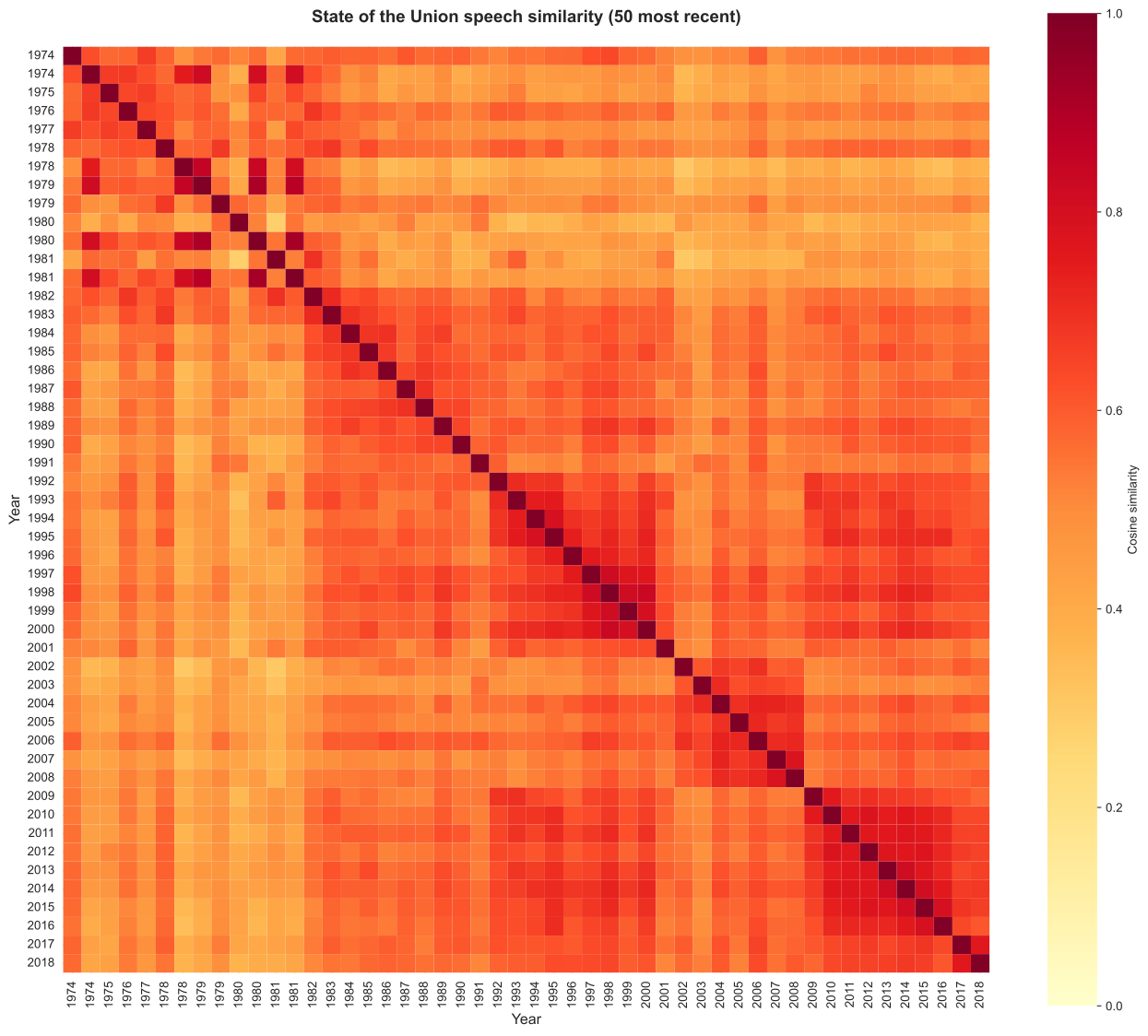
Numbers are hard to interpret. Let’s create a heatmap - a visual representation of the similarity matrix where color intensity shows similarity strength.
8.1 Creating a basic heatmap
# Create heatmapplt.figure(figsize=(14, 12))sns.heatmap( similarity_df, cmap='YlOrRd', # Yellow-Orange-Red colormap vmin=0, vmax=1, # Similarity ranges from 0 to 1 square=True, # Make cells square cbar_kws={'label': 'Cosine similarity'})plt.title('State of the Union speech similarity (50 most recent)', fontsize=14, fontweight='bold', pad=20)plt.xlabel('Year', fontsize=12)plt.ylabel('Year', fontsize=12)plt.tight_layout()plt.show()
How to read this heatmap:
Each cell represents similarity between two speeches
Color intensity: Darker red = more similar, lighter yellow = less similar
Diagonal: Always dark red (each speech is identical to itself)
Symmetric: Upper-right mirrors lower-left
Patterns: Clusters of dark red reveal groups of similar speeches
TipWhat to look for
Scan the heatmap for patterns:
Stripes: One speech similar to many others (maybe very generic language)
Blocks: Groups of consecutive years with high similarity (stable period)
Isolates: Speeches unlike anything around them (rhetorical innovation?)
Diagonal bands: Speeches similar to nearby years (temporal autocorrelation)
8.2 Improving the visualization
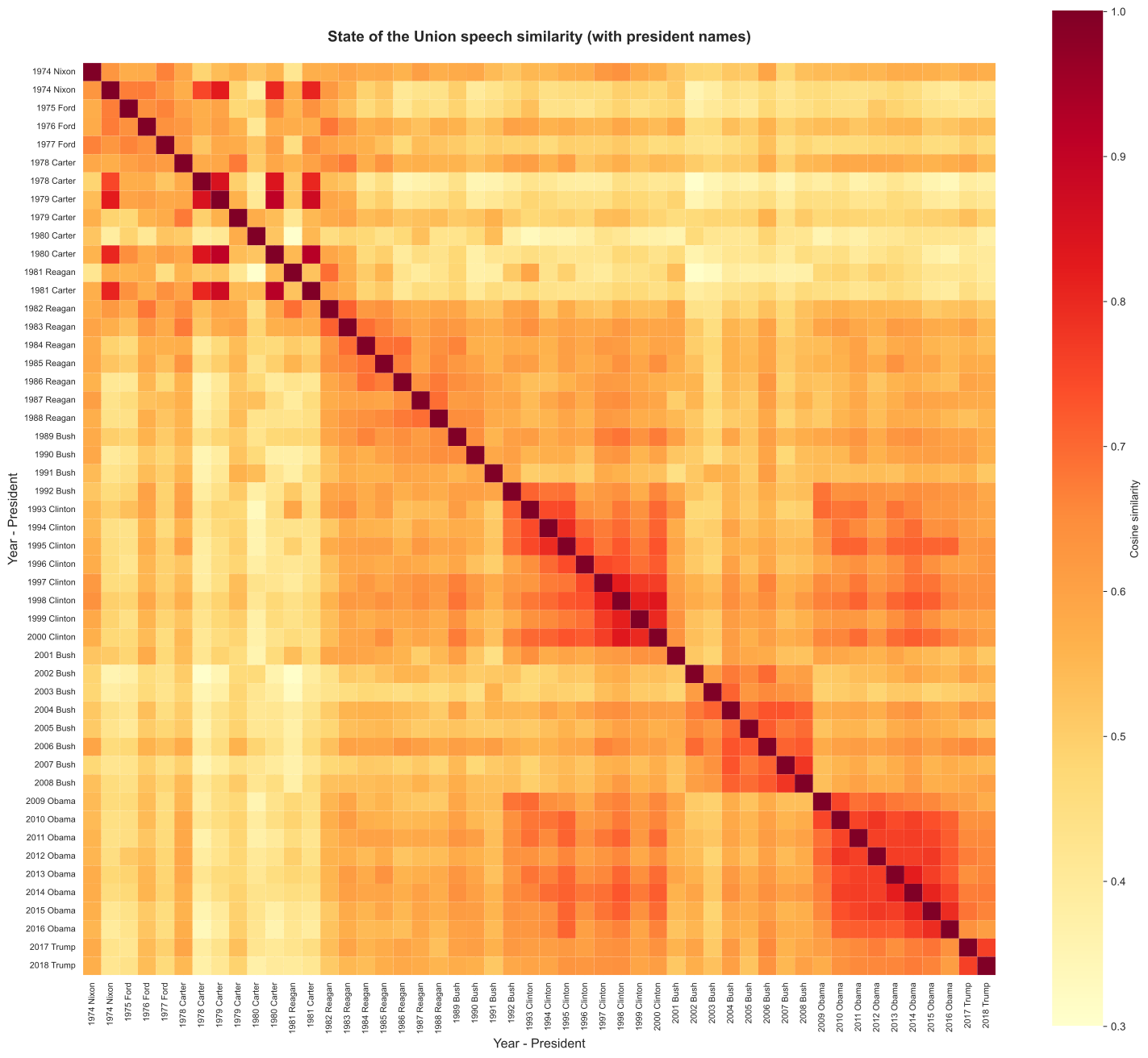
Let’s add president names to make patterns clearer:
# Create labels with year and president last namelabels = [f"{row['year']}{row['president'].split()[-1]}"for _, row in recent_speeches.iterrows()]# Create improved heatmapplt.figure(figsize=(16, 14))sns.heatmap( similarity_df, cmap='YlOrRd', vmin=0.3, vmax=1.0, # Adjust range to emphasize differences square=True, cbar_kws={'label': 'Cosine similarity'}, xticklabels=labels, yticklabels=labels)plt.title('State of the Union speech similarity (with president names)', fontsize=14, fontweight='bold', pad=20)plt.xlabel('Year - President', fontsize=12)plt.ylabel('Year - President', fontsize=12)plt.xticks(rotation=90, fontsize=8)plt.yticks(rotation=0, fontsize=8)plt.tight_layout()plt.show()
Questions to ask the heatmap:
Do speeches by the same president cluster together (high similarity)?
Do speeches from the same decade cluster together?
Are there any outlier speeches very different from all others?
Can you spot transitions between different rhetorical eras?
9 Identifying the most and least similar speeches
Let’s find specific examples of highly similar and highly different speeches:
9.1 Most similar speech pairs
# Extract upper triangle (to avoid counting each pair twice)upper_triangle_indices = np.triu_indices_from(similarity_matrix, k=1)similarities_upper = similarity_matrix[upper_triangle_indices]# Get indices of top 10 most similar pairstop_indices = np.argsort(similarities_upper)[-10:][::-1]# Extract speech pairsmost_similar = []for idx in top_indices: i = upper_triangle_indices[0][idx] j = upper_triangle_indices[1][idx] most_similar.append({'speech_1_year': recent_speeches.loc[i, 'year'],'speech_1_pres': recent_speeches.loc[i, 'president'],'speech_2_year': recent_speeches.loc[j, 'year'],'speech_2_pres': recent_speeches.loc[j, 'president'],'similarity': similarity_matrix[i, j] })most_similar_df = pd.DataFrame(most_similar)print("Top 10 most similar speech pairs:\n")print(most_similar_df.to_string(index=False))
Top 10 most similar speech pairs:

 speech_1_year      speech_1_pres  speech_2_year      speech_2_pres  similarity
          1980       Jimmy Carter           1981       Jimmy Carter    0.920566
          1979       Jimmy Carter           1980       Jimmy Carter    0.909339
          1979       Jimmy Carter           1981       Jimmy Carter    0.876421
          1978       Jimmy Carter           1979       Jimmy Carter    0.851648
          1978       Jimmy Carter           1980       Jimmy Carter    0.842294
          1998 William J. Clinton           2000 William J. Clinton    0.834129
          1974      Richard Nixon           1979       Jimmy Carter    0.823473
          1997 William J. Clinton           1998 William J. Clinton    0.820596
          2013       Barack Obama           2014       Barack Obama    0.819733
          1998 William J. Clinton           1999 William J. Clinton    0.819171
Interpretation: High similarity pairs often come from:
Consecutive years by the same president (consistent themes)
Same historical period with shared concerns
Similar political circumstances or crises
9.2 Most different speech pairs
# Get indices of bottom 10 (most different pairs)bottom_indices = np.argsort(similarities_upper)[:10]# Extract speech pairsmost_different = []for idx in bottom_indices: i = upper_triangle_indices[0][idx] j = upper_triangle_indices[1][idx] most_different.append({'speech_1_year': recent_speeches.loc[i, 'year'],'speech_1_pres': recent_speeches.loc[i, 'president'],'speech_2_year': recent_speeches.loc[j, 'year'],'speech_2_pres': recent_speeches.loc[j, 'president'],'similarity': similarity_matrix[i, j] })most_different_df = pd.DataFrame(most_different)print("Top 10 most different speech pairs:\n")print(most_different_df.to_string(index=False))
Top 10 most different speech pairs:

 speech_1_year speech_1_pres  speech_2_year      speech_2_pres  similarity
          1980  Jimmy Carter           1981      Ronald Reagan    0.282940
          1978  Jimmy Carter           2002     George W. Bush    0.303841
          1981 Ronald Reagan           2002     George W. Bush    0.307277
          1981 Ronald Reagan           2003     George W. Bush    0.326915
          1980  Jimmy Carter           1993 William J. Clinton    0.331248
          1978  Jimmy Carter           2016       Barack Obama    0.336520
          1978  Jimmy Carter           2007     George W. Bush    0.347287
          1978  Jimmy Carter           1986      Ronald Reagan    0.348026
          1978  Jimmy Carter           2003     George W. Bush    0.349533
          1978  Jimmy Carter           1990        George Bush    0.349626
Interpretation: Low similarity pairs often come from:
Very different historical eras (e.g., Cold War vs post-9/11)
Different dominant issues (economy vs war, domestic vs foreign policy)
Different rhetorical styles (formal vs informal, optimistic vs somber)
10 Temporal patterns: Tracking linguistic change
Now let’s use document similarity to study how political language changes over time. We’ll ask: When did American political rhetoric shift most dramatically?
10.1 Average similarity to surrounding years
One way to detect change is to measure how similar each speech is to speeches from nearby years:
# For each speech, calculate average similarity to speeches within ±5 yearstemporal_similarity = []for idx, row in recent_speeches.iterrows(): year = row['year']# Find speeches within ±5 years nearby_mask = (recent_speeches['year'] >= year -5) &\ (recent_speeches['year'] <= year +5) &\ (recent_speeches['year'] != year) # Exclude the speech itselfif nearby_mask.sum() >0: # If there are nearby speeches nearby_indices = recent_speeches[nearby_mask].index similarities_to_nearby = similarity_matrix[idx, nearby_indices] avg_similarity = similarities_to_nearby.mean()else: avg_similarity = np.nan temporal_similarity.append({'year': year,'president': row['president'],'avg_similarity_to_nearby': avg_similarity })temporal_df = pd.DataFrame(temporal_similarity)print("Temporal similarity to nearby years (sample):")print(temporal_df.head(10))
Temporal similarity to nearby years (sample):
   year       president  avg_similarity_to_nearby
0  1974   Richard Nixon                  0.571503
1  1974   Richard Nixon                  0.657587
2  1975  Gerald R. Ford                  0.592873
3  1976  Gerald R. Ford                  0.586381
4  1977  Gerald R. Ford                  0.592274
5  1978    Jimmy Carter                  0.603011
6  1978    Jimmy Carter                  0.604526
7  1979    Jimmy Carter                  0.639264
8  1979    Jimmy Carter                  0.545035
9  1980    Jimmy Carter                  0.460207
10.2 Visualizing temporal stability
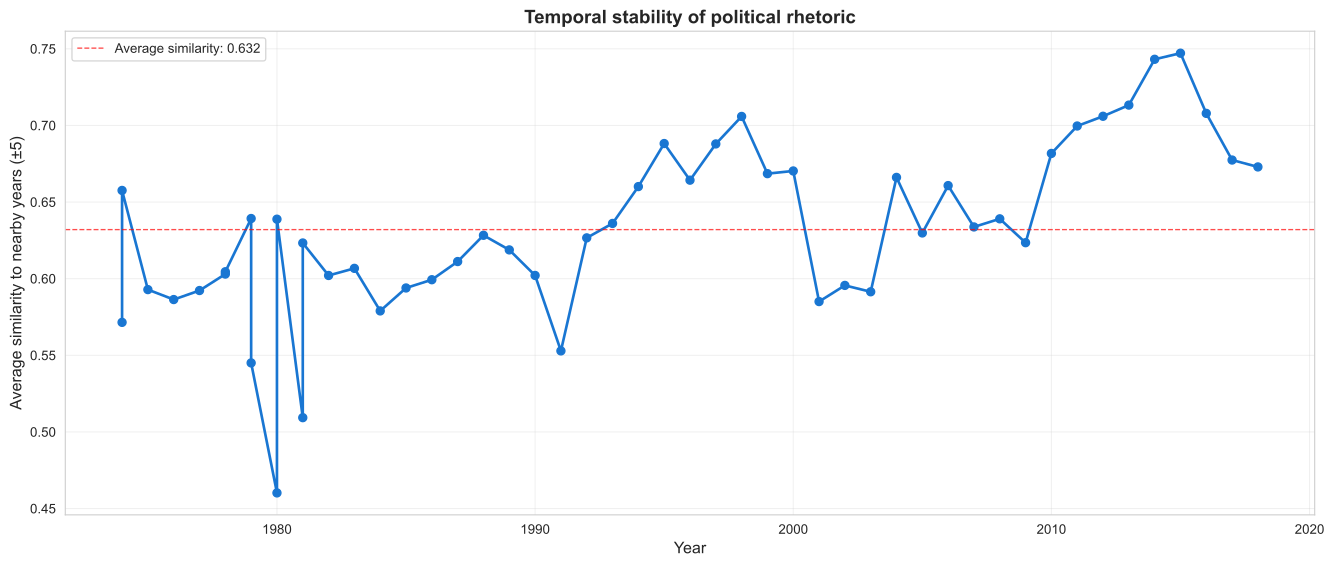
# Plot temporal similarity over timeplt.figure(figsize=(14, 6))plt.plot(temporal_df['year'], temporal_df['avg_similarity_to_nearby'], marker='o', linewidth=2, markersize=6, color='#1976D2')plt.axhline(y=temporal_df['avg_similarity_to_nearby'].mean(), color='red', linestyle='--', linewidth=1, alpha=0.7, label=f"Average similarity: {temporal_df['avg_similarity_to_nearby'].mean():.3f}")plt.xlabel('Year', fontsize=12)plt.ylabel('Average similarity to nearby years (±5)', fontsize=12)plt.title('Temporal stability of political rhetoric', fontsize=14, fontweight='bold')plt.legend()plt.grid(True, alpha=0.3)plt.tight_layout()plt.show()
How to interpret this plot:
High points: Speech is very similar to nearby years (stable period, consistent rhetoric)
Low points: Speech is different from nearby years (innovation, major shift, unique circumstances)
Trends: Overall increase/decrease in similarity over time
Drops: Sudden changes in political language
10.3 Finding moments of rhetorical innovation
Let’s identify speeches that are most different from their temporal neighbors - these are moments of rhetorical change:
# Find speeches with lowest similarity to nearby yearsinnovations = temporal_df.nsmallest(10, 'avg_similarity_to_nearby')print("Top 10 speeches most different from their era:\n")print(innovations[['year', 'president', 'avg_similarity_to_nearby']].to_string(index=False))
Top 10 speeches most different from their era:

 year      president  avg_similarity_to_nearby
 1980   Jimmy Carter                  0.460207
 1981  Ronald Reagan                  0.509312
 1979   Jimmy Carter                  0.545035
 1991    George Bush                  0.552880
 1974  Richard Nixon                  0.571503
 1984  Ronald Reagan                  0.578964
 2001 George W. Bush                  0.585065
 1976 Gerald R. Ford                  0.586381
 2003 George W. Bush                  0.591457
 1977 Gerald R. Ford                  0.592274
These speeches represent moments when presidential rhetoric broke from recent patterns. Research question: What historical events coincide with these rhetorical innovations?
11 Scaling up: Analyzing the full dataset
Now that we understand the concepts, let’s apply them to the entire State of the Union corpus (200+ years). This will reveal long-term patterns invisible in our 50-speech sample.
11.1 Preparing the full dataset
# Use all speechesprint(f"Full dataset: {len(speeches)} speeches from {speeches['year'].min()} to {speeches['year'].max()}")# For very large datasets, we might want to limit vocabulary more aggressively# to keep computation manageablefull_tfidf_vectorizer = TfidfVectorizer( max_features=500, # Reduce to top 500 words for speed stop_words='english', min_df=5, # Word must appear in at least 5 speeches max_df=0.8, # Ignore words in >80% of speeches (too common) lowercase=True)# Create TF-IDF matrixprint("\nCreating TF-IDF matrix for full corpus...")full_tfidf_matrix = full_tfidf_vectorizer.fit_transform(speeches['transcript'])print(f"✓ TF-IDF matrix created: {full_tfidf_matrix.shape}")
Full dataset: 244 speeches from 1790 to 2018

Creating TF-IDF matrix for full corpus...
✓ TF-IDF matrix created: (244, 500)
Computing similarity for all pairs requires calculating \(n \times n\) comparisons where \(n\) = number of documents. For 244 speeches, this means 59,536 comparisons.
For very large corpora (10,000+ documents), this becomes computationally expensive. In those cases, you’d use approximation methods or only compute similarities to a subset of documents.
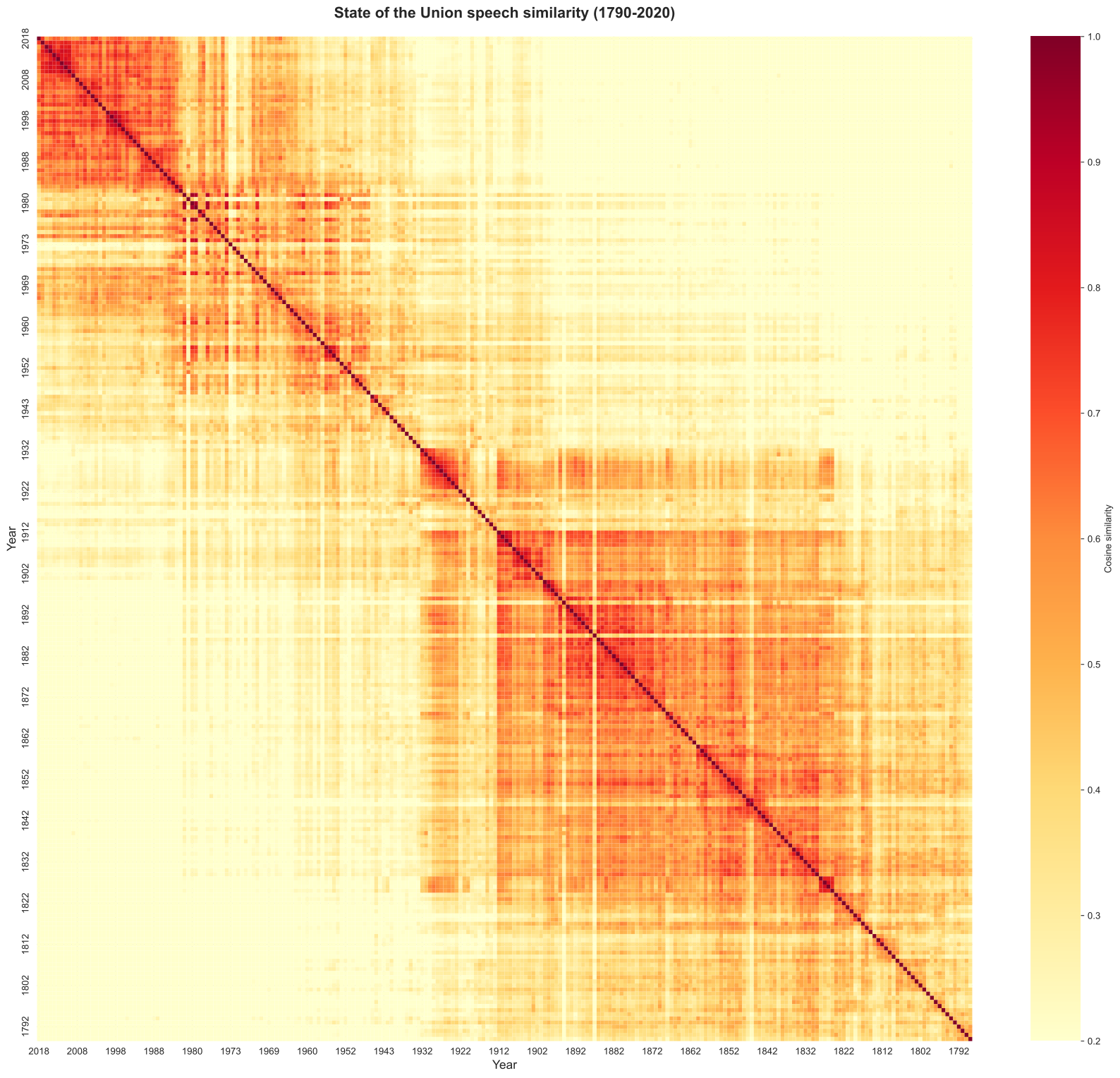
11.3 Visualizing 200 years of rhetorical similarity
# Create DataFrame with year labelsfull_similarity_df = pd.DataFrame( full_similarity_matrix, index=speeches['year'], columns=speeches['year'])# Create heatmap for full timelineplt.figure(figsize=(18, 16))sns.heatmap( full_similarity_df, cmap='YlOrRd', vmin=0.2, vmax=1.0, cbar_kws={'label': 'Cosine similarity'}, xticklabels=10, # Show every 10th year label (too many to show all) yticklabels=10)plt.title('State of the Union speech similarity (1790-2020)', fontsize=16, fontweight='bold', pad=20)plt.xlabel('Year', fontsize=13)plt.ylabel('Year', fontsize=13)plt.tight_layout()plt.show()
What this reveals: Look for:
Diagonal structure: Speeches similar to nearby years (temporal continuity)
Block patterns: Eras of sustained similarity (stable periods)
Breaks: Sudden transitions between eras (e.g., Civil War, World Wars, modern era)
Recent vs historical: Are recent speeches more similar to each other than to 19th century speeches?
This single visualization summarizes 200 years of American political language evolution.
12 Identifying historical eras through clustering
The heatmap suggests there are distinct “eras” of political rhetoric. Let’s make this more explicit by identifying periods of high internal similarity.
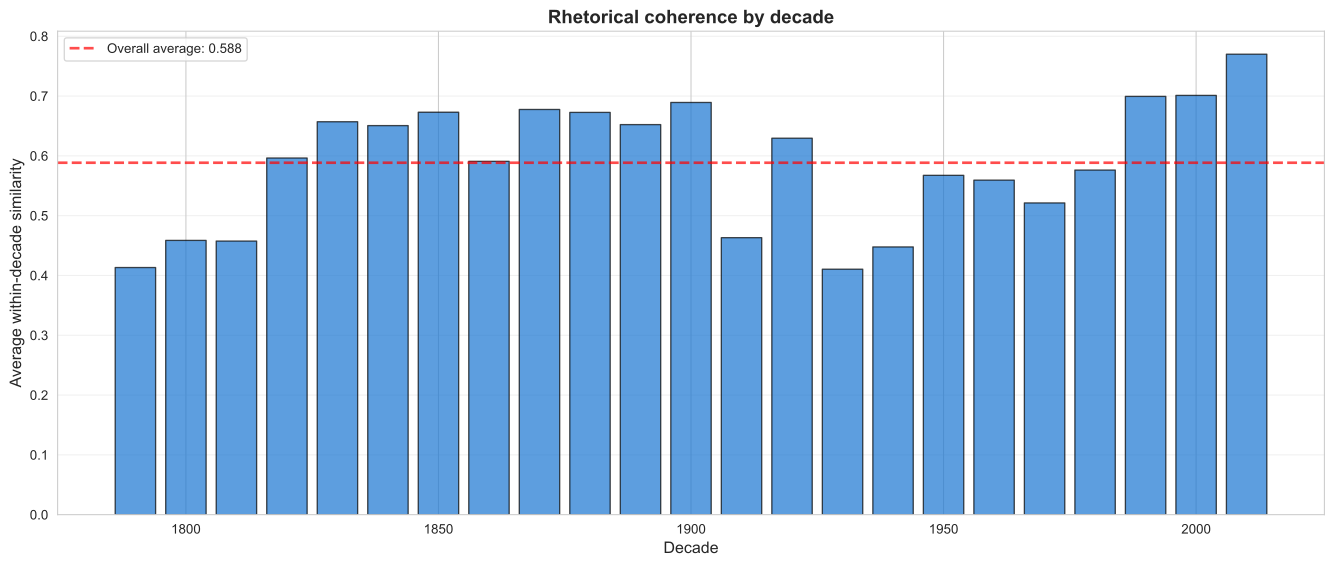
12.1 Average similarity by decade
# Add decade to speechesspeeches_with_decade = speeches.copy()speeches_with_decade['decade'] = (speeches_with_decade['year'] //10) *10# Calculate average similarity within each decadedecade_similarities = []for decade insorted(speeches_with_decade['decade'].unique()): decade_speeches = speeches_with_decade[speeches_with_decade['decade'] == decade] decade_indices = decade_speeches.index.tolist()iflen(decade_indices) >1: # Need at least 2 speeches to compute similarity# Extract similarities within this decade decade_sim_matrix = full_similarity_matrix[np.ix_(decade_indices, decade_indices)]# Get upper triangle (exclude diagonal and duplicates) upper_tri = np.triu_indices_from(decade_sim_matrix, k=1) within_decade_similarities = decade_sim_matrix[upper_tri] avg_sim = within_decade_similarities.mean()else: avg_sim = np.nan decade_similarities.append({'decade': decade,'avg_similarity': avg_sim,'n_speeches': len(decade_indices) })decade_df = pd.DataFrame(decade_similarities)print("Average similarity within each decade:")print(decade_df.to_string(index=False))
High bars: Decades with consistent rhetoric (presidents using similar language)
Low bars: Decades with diverse rhetoric (presidents diverging in language use)
Trends: Are recent decades more or less coherent than historical ones?
This captures whether each era had a distinctive “voice” or was linguistically fragmented.
13 Finding the most distinctive speeches
Which individual speeches are most unlike all others? These are the rhetorical outliers - speeches that broke the mold.
13.1 Computing average similarity to all other speeches
# For each speech, calculate average similarity to all othersspeech_distinctiveness = []for idx inrange(len(speeches)):# Get similarities to all other speeches (excluding self) other_indices = [i for i inrange(len(speeches)) if i != idx] similarities_to_others = full_similarity_matrix[idx, other_indices] avg_similarity = similarities_to_others.mean() speech_distinctiveness.append({'year': speeches.loc[idx, 'year'],'president': speeches.loc[idx, 'president'],'avg_similarity_to_others': avg_similarity })distinctiveness_df = pd.DataFrame(speech_distinctiveness)print("Distinctiveness calculated for all speeches")
Distinctiveness calculated for all speeches
13.2 Most distinctive (unique) speeches
# Find speeches least similar to all othersmost_distinctive = distinctiveness_df.nsmallest(15, 'avg_similarity_to_others')print("Top 15 most distinctive (unique) speeches:\n")print(most_distinctive.to_string(index=False))
Top 15 most distinctive (unique) speeches:

 year            president  avg_similarity_to_others
 1980         Jimmy Carter                  0.194556
 1973        Richard Nixon                  0.210759
 1973        Richard Nixon                  0.217444
 1813        James Madison                  0.228440
 1956 Dwight D. Eisenhower                  0.228784
 1895     Grover Cleveland                  0.229446
 1809        James Madison                  0.229787
 1790    George Washington                  0.230277
 1819         James Monroe                  0.231735
 1814        James Madison                  0.237407
 1887     Grover Cleveland                  0.241124
 1811        James Madison                  0.249762
 1797           John Adams                  0.250698
 1973        Richard Nixon                  0.252397
 1795    George Washington                  0.253289
These speeches used language very different from typical State of the Union rhetoric. Possible reasons:
# Find speeches most similar to all othersmost_typical = distinctiveness_df.nlargest(15, 'avg_similarity_to_others')print("Top 15 most typical (representative) speeches:\n")print(most_typical.to_string(index=False))
Top 15 most typical (representative) speeches:

 year           president  avg_similarity_to_others
 1912 William Howard Taft                  0.440187
 1886    Grover Cleveland                  0.435741
 1907  Theodore Roosevelt                  0.430657
 1880 Rutherford B. Hayes                  0.419834
 1911 William Howard Taft                  0.419200
 1851    Millard Fillmore                  0.418387
 1899    William McKinley                  0.417140
 1888    Grover Cleveland                  0.416887
 1875    Ulysses S. Grant                  0.416650
 1854     Franklin Pierce                  0.415680
 1883   Chester A. Arthur                  0.414415
 1885    Grover Cleveland                  0.413796
 1829      Andrew Jackson                  0.412433
 1858      James Buchanan                  0.412172
 1879 Rutherford B. Hayes                  0.411754
These speeches exemplify “standard” State of the Union rhetoric - they use language common across the entire corpus. If you wanted to understand what a “typical” presidential speech sounds like, these are good examples.
14 Applications and extensions
Now that you understand document similarity, here are ways to apply and extend these techniques:
14.1 1. Detecting plagiarism or borrowing
High similarity between speeches by different presidents might indicate:
Borrowing of phrases or themes
Shared speechwriters
Common policy priorities
# Find high-similarity pairs by different presidentsdifferent_president_pairs = []for i inrange(len(speeches)):for j inrange(i+1, len(speeches)):if speeches.loc[i, 'president'] != speeches.loc[j, 'president']: sim = full_similarity_matrix[i, j]if sim >0.7: # High similarity threshold different_president_pairs.append({'pres_1': speeches.loc[i, 'president'],'year_1': speeches.loc[i, 'year'],'pres_2': speeches.loc[j, 'president'],'year_2': speeches.loc[j, 'year'],'similarity': sim })if different_president_pairs: borrowing_df = pd.DataFrame(different_president_pairs).sort_values('similarity', ascending=False)print("Highly similar speeches by different presidents (top 10):\n")print(borrowing_df.head(10).to_string(index=False))else:print("No speech pairs by different presidents exceed 0.7 similarity")
Highly similar speeches by different presidents (top 10):

           pres_1  year_1              pres_2  year_2  similarity
     Jimmy Carter    1979       Richard Nixon    1974    0.873915
     Jimmy Carter    1981       Richard Nixon    1974    0.850204
     Jimmy Carter    1980       Richard Nixon    1974    0.843814
     Jimmy Carter    1978       Richard Nixon    1974    0.833850
  Donald J. Trump    2017        Barack Obama    2015    0.794668
 Grover Cleveland    1885 Rutherford B. Hayes    1877    0.794271
     Jimmy Carter    1979       Richard Nixon    1972    0.793148
  Donald J. Trump    2017        Barack Obama    2011    0.792755
     Barack Obama    2014  William J. Clinton    1998    0.790826
Benjamin Harrison    1889    Grover Cleveland    1885    0.789958
14.2 2. Finding speeches similar to a query
If you have new text (e.g., a recent speech not in the corpus), you can find which historical speeches are most similar:
# Example: Find speeches most similar to the most recent onequery_idx = speeches['year'].idxmax() # Index of most recent speechquery_year = speeches.loc[query_idx, 'year']query_pres = speeches.loc[query_idx, 'president']# Get similarities to all other speechessimilarities_to_query = full_similarity_matrix[query_idx]# Create DataFrame and sortsimilar_to_query = pd.DataFrame({'year': speeches['year'],'president': speeches['president'],'similarity': similarities_to_query})# Exclude the query speech itselfsimilar_to_query = similar_to_query[similar_to_query['year'] != query_year]print(f"Speeches most similar to {query_year} ({query_pres}):\n")print(similar_to_query.nlargest(10, 'similarity').to_string(index=False))
Speeches most similar to 2018 (Donald J. Trump):

 year          president  similarity
 2017    Donald J. Trump    0.742176
 2003     George W. Bush    0.720348
 1997 William J. Clinton    0.707636
 2004     George W. Bush    0.691119
 2006     George W. Bush    0.679458
 1998 William J. Clinton    0.679391
 2014       Barack Obama    0.675868
 2013       Barack Obama    0.666606
 1986      Ronald Reagan    0.664662
 1999 William J. Clinton    0.655298
This reveals which past rhetoric most closely resembles a given speech - useful for understanding historical precedents.
14.3 3. Tracking specific topics over time
You could filter the vocabulary to topic-specific words (e.g., only economy-related words) and track similarity within that topic area:
# Example: Create TF-IDF matrix using only economy-related wordseconomy_words = ['economy', 'economic', 'jobs', 'employment', 'trade', 'business', 'industry', 'commerce', 'prosperity', 'growth','unemployment', 'recession', 'inflation', 'budget', 'deficit']economy_tfidf = TfidfVectorizer( vocabulary=economy_words, # Only use these words lowercase=True)# This would create vectors based only on economic vocabulary# allowing you to measure similarity specifically in economic rhetoriceconomy_matrix = economy_tfidf.fit_transform(speeches['transcript'])print(f"Economy-focused TF-IDF matrix: {economy_matrix.shape}")print("This captures similarity in economic rhetoric only")
Economy-focused TF-IDF matrix: (244, 15)
This captures similarity in economic rhetoric only
15 Summary and key takeaways
In this lab, we learned how to compare entire documents using vector representations and cosine similarity.
Emphasizes words that are frequent in a document but rare across the corpus
Vector representation
Each document is a point (or arrow) in high-dimensional space
Cosine similarity
Measures the angle between document vectors (0 = different, 1 = identical)
Temporal analysis
Using document similarity to track linguistic change over time
15.2 What we built
Starting from raw text, we created:
TF-IDF weighted vectors for all speeches
Pairwise similarity matrix (all speeches compared to all others)
Heatmap visualization of 200 years of rhetoric
Identification of rhetorical eras, outliers, and transitions
Temporal trends in linguistic stability
15.3 Key insights
Document-level analysis reveals patterns invisible to word-level analysis:
Temporal continuity: Speeches cluster by time period (language changes slowly)
Rhetorical eras: Distinct periods of shared language (e.g., Cold War, post-9/11)
Outliers: Speeches that broke from contemporary norms
Borrowing: High similarity across presidents suggests shared themes or language
15.4 Comparison to earlier labs
Lab
Level
Question
Method
Lab 01
Word
How often is word X used?
Frequency counting
Lab 02
Word
Is word X more Democratic or Republican?
Log-likelihood, log odds
Lab 03
Word
Which words cluster with category Y?
PMI, dictionary induction
Lab 04
Document
Which documents are similar?
TF-IDF, cosine similarity
Each lab builds on previous ones, adding new levels of analysis.
16 Exercises
Try these to deepen your understanding:
16.1 Exercise 1: Party-based clustering
Split speeches by party (Democratic vs Republican) and compute average within-party vs between-party similarity. Are speeches more similar within party or across party lines? Has this changed over time?
16.2 Exercise 2: Presidential signature rhetoric
For each president with at least 5 speeches, compute:
Average similarity among their own speeches (rhetorical consistency)
Average similarity to all other presidents’ speeches (distinctiveness)
Who is the most consistent? Who is the most distinctive?
16.3 Exercise 3: Foreign vs domestic policy
Create two TF-IDF matrices:
Using only foreign policy vocabulary (war, peace, treaty, alliance, defense, etc.)
Using only domestic policy vocabulary (jobs, health, education, infrastructure, etc.)
Compute similarity matrices for each. Do speeches cluster differently based on policy domain?
16.4 Exercise 4: Influential speeches
Hypothesis: “Influential” speeches are those highly similar to later speeches (not earlier ones) - they set trends rather than follow them.
For each speech, compute:
Average similarity to speeches in the previous 5 years
Average similarity to speeches in the next 5 years
Speeches with high “future similarity” but low “past similarity” might be rhetorical innovators that later presidents emulated.
16.5 Exercise 5: Shortest path through history
Using the full similarity matrix as a “network” where speeches are nodes and similarity scores are edge weights, find the “path” through history that maximizes total similarity. This would reveal the smoothest rhetorical evolution from 1790 to 2020.
Hint: At each step, move to the most similar speech that’s later in time.
16.6 Exercise 6: Validation with known events
Choose 3-5 major historical events (World War II, 9/11, 2008 financial crisis, etc.). Do speeches given during/after these events show distinctive patterns in:
Similarity to surrounding years?
Similarity to other crisis speeches?
Overall distinctiveness?
This validates whether your method detects known rhetorical shifts.
17 References and further reading
17.1 Foundational papers
Silge, J., & Robinson, D. (2017). Text Mining with R. Chapter 3 Analyzing word and document frequency: tf-idf. https://www.tidytextmining.com/tfidf
Manning, C. D., Raghavan, P., & Schütze, H. (2008). Introduction to information retrieval. Cambridge university press. Chapter 6 Scoring, term weighting and the vector space model. https://nlp.stanford.edu/IR-book/pdf/06vect.pdf
Rule, A., Cointet, J.-P., & Bearman, P. S. (2015). Lexical shifts, substantive changes, and continuity in State of the Union discourse, 1790–2014. Proceedings of the National Academy of Sciences, 112(35), 10837-10844. https://doi.org/10.1073/pnas.1512221112
17.2 Applications in political science
Grimmer, J., & Stewart, B. M. (2013). Text as data: The promise and pitfalls of automatic content analysis methods for political texts. Political Analysis, 21(3), 267-297. https://doi.org/10.1093/pan/mps028
Laver, M., Benoit, K., & Garry, J. (2003). Extracting policy positions from political texts using words as data. American Political Science Review, 97(2), 311-331. https://doi.org/10.1017/S0003055403000698