How to transform unstructured text into structured data
What tokenization is and why it matters
How word frequencies reveal patterns in text
Zipf’s Law and its implications for text analysis
What stop words are and when to remove them
The basics of text preprocessing
What stylometry is and how function words reveal authorship
How to use Python and pandas for basic text analysis
2 Introduction: Why Text as Data?
Text is everywhere: social media posts, news articles, scientific papers, government documents, customer reviews. But text in its raw form is unstructured - it’s just sequences of characters. To analyze text computationally, we need to transform it into structured data that computers can process mathematically.
Think of it this way: if you wanted to compare two novels, you could read both and form an impression. But what if you had 1,000 novels? Or 100,000 tweets? This is where computational text analysis becomes essential.
2.1 Our Dataset: State of the Union Addresses
Today we’ll work with a collection of State of the Union addresses - speeches given by US presidents from the 18th century to 2018. These speeches are:
Historical: Spanning over 200 years
Political: Reflecting different eras and priorities
Comparable: Same genre, same occasion, different authors
This makes them perfect for learning text analysis techniques.
# you will need to run it once after installing spaCy!python-m spacy download en_core_web_sm
# Data manipulationimport pandas as pd# Text processingimport spacyfrom collections import Counter# Visualizationimport matplotlib.pyplot as pltimport seaborn as sns# For word cloudsfrom wordcloud import WordCloud# Set visualization stylesns.set_style("whitegrid")plt.rcParams['figure.figsize'] = (12, 6)print("✓ Packages loaded successfully")
✓ Packages loaded successfully
Note📌 About these packages
pandas: Works with tabular data (like spreadsheets)
spaCy: Processes natural language text
matplotlib/seaborn: Create visualizations
wordcloud: Generate word cloud visualizations
4 Loading and Exploring the Data
Let’s load our dataset:
# Load the dataspeeches = pd.read_csv("data/transcripts.csv")# Display first few rowsprint("Dataset shape:", speeches.shape)print("\nFirst few rows:")speeches.head()
Dataset shape: (244, 5)

First few rows:
date
president
title
url
transcript
0
2018-01-30
Donald J. Trump
Address Before a Joint Session of the Congress...
https://www.cnn.com/2018/01/30/politics/2018-s...
\nMr. Speaker, Mr. Vice President, Members of ...
1
2017-02-28
Donald J. Trump
Address Before a Joint Session of the Congress
http://www.presidency.ucsb.edu/ws/index.php?pi...
Thank you very much. Mr. Speaker, Mr. Vice Pre...
2
2016-01-12
Barack Obama
Address Before a Joint Session of the Congress...
http://www.presidency.ucsb.edu/ws/index.php?pi...
Thank you. Mr. Speaker, Mr. Vice President, Me...
3
2015-01-20
Barack Obama
Address Before a Joint Session of the Congress...
http://www.presidency.ucsb.edu/ws/index.php?pi...
The President. Mr. Speaker, Mr. Vice President...
4
2014-01-28
Barack Obama
Address Before a Joint Session of the Congress...
http://www.presidency.ucsb.edu/ws/index.php?pi...
The President. Mr. Speaker, Mr. Vice President...
4.1 Understanding the Data Structure
Our data is in tabular format - like a spreadsheet with rows and columns:
# Check column names and typesprint("Columns:")print(speeches.dtypes)# Basic statisticsprint("\nNumber of speeches:", len(speeches))print("Number of presidents:", speeches['president'].nunique())print("\nDate range:")print(" Earliest:", speeches['date'].min())print(" Latest:", speeches['date'].max())
Columns:
date          object
president     object
title         object
url           object
transcript    object
dtype: object

Number of speeches: 244
Number of presidents: 42

Date range:
  Earliest: 1790-01-08
  Latest: 2018-01-30
Each row represents one speech. The columns contain:
date: When the speech was given
president: Who gave it
title: The speech’s official title
url: Where the transcript came from
transcript: The actual text of the speech
Let’s look at a short excerpt:
# Display a snippet of one speechsample_text = speeches.loc[0, 'transcript'][:500] # First 500 charactersprint("Sample from first speech:")print(sample_text)print("...")
Sample from first speech:

Mr. Speaker, Mr. Vice President, Members of Congress, the First Lady of the United States, and my fellow Americans:
Less than 1 year has passed since I first stood at this podium, in this majestic chamber, to speak on behalf of the American People -- and to address their concerns, their hopes, and their dreams.  That night, our new Administration had already taken swift action.  A new tide of optimism was already sweeping across our land.
Each day since, we have gone forward with a clear vision
...
Tip💡 Why This Structure?
Text data commonly comes with metadata (data about data):
Author, date, source, title, etc.
This metadata helps us compare and analyze texts
We keep text and metadata together in a table
5 From Text to Tokens - The Bag of Words Model
5.1 The Challenge: Text is Unstructured
Right now, our transcript column contains long strings of text. How do we measure or compare them? We can’t easily do math on text!
5.2 The Solution: Tokenization
Tokenization is the process of splitting text into smaller units called tokens. Usually, tokens are words, but they could also be:
Characters (letters)
Sentences
N-grams (sequences of N words)
Let’s see this in action:
# Simple example: split text into wordsexample ="Python is great for text analysis"words = example.split()print("Original text:", example)print("Tokens (words):", words)print("Number of tokens:", len(words))
Original text: Python is great for text analysis
Tokens (words): ['Python', 'is', 'great', 'for', 'text', 'analysis']
Number of tokens: 6
5.3 Tokenizing Our Speeches
Now let’s tokenize one full speech:
# Get one speechspeech_text = speeches.loc[0, 'transcript']# Simple tokenization (just splitting on spaces)simple_tokens = speech_text.split()print(f"Speech length: {len(speech_text)} characters")print(f"Number of tokens: {len(simple_tokens)}")print(f"\nFirst 20 tokens:")print(simple_tokens[:20])
Once we have tokens, we can treat text as a “bag of words” - we:
Ignore word order (“cat dog” = “dog cat”)
Count word frequencies
Represent text as numbers
This might seem like we’re throwing away information (word order matters!), but this simple model is surprisingly powerful for many tasks.
Let’s create a bag of words for one speech:
# Count word frequenciesword_counts = Counter(simple_tokens)# Show most common wordsprint("Top 15 most frequent words:")for word, count in word_counts.most_common(15):print(f" {word}: {count}")
Top 15 most frequent words:
  the: 215
  and: 184
  to: 175
  of: 121
  our: 95
  we: 88
  a: 79
  in: 72
  is: 61
  are: 48
  that: 45
  --: 44
  have: 40
  for: 34
  will: 34
5.5 Two Data Formats: Long vs Wide
We can represent tokenized text in two ways:
Long format: One row per word occurrence
president    word
Trump        the
Trump        economy
Trump        is
Trump        strong
Wide format: One row per document, one column per unique word
president    the    economy    is    strong
Trump        150    12         89    5
For now, we’ll work with long format because it’s easier to understand and manipulate.
6 Tokenizing All Speeches
Let’s tokenize all speeches and create a long-format dataset:
# Initialize empty list to store resultsall_tokens = []# Process each speechfor idx, row in speeches.iterrows(): president = row['president'] text = row['transcript']# Simple tokenization tokens = text.lower().split() # Convert to lowercase# Add each token to our listfor token in tokens: all_tokens.append({'president': president,'word': token })# Convert to DataFrametokens_df = pd.DataFrame(all_tokens)print(f"Total number of tokens: {len(tokens_df):,}")print(f"\nFirst few rows:")tokens_df.head(10)
Total number of tokens: 3,947,946

First few rows:
president
word
0
Donald J. Trump
mr.
1
Donald J. Trump
speaker,
2
Donald J. Trump
mr.
3
Donald J. Trump
vice
4
Donald J. Trump
president,
5
Donald J. Trump
members
6
Donald J. Trump
of
7
Donald J. Trump
congress,
8
Donald J. Trump
the
9
Donald J. Trump
first
6.1 How many unique words?
unique_words = tokens_df['word'].nunique()print(f"Number of unique words: {unique_words:,}")
Number of unique words: 68,356
That’s a lot of unique words! But are they all useful?
7 Word Frequencies
Now let’s count how often each word appears:
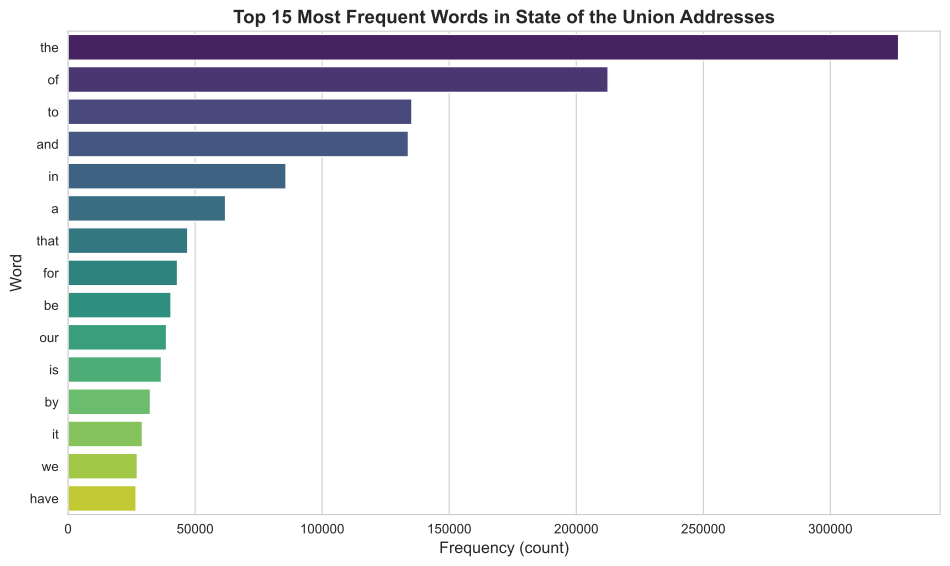
# Count word frequenciesword_freq = tokens_df['word'].value_counts().reset_index()word_freq.columns = ['word', 'count']print("Top 20 most frequent words:")print(word_freq.head(20))
Top 20 most frequent words:
     word   count
0     the  326862
1      of  212531
2      to  135329
3     and  133944
4      in   85772
5       a   61992
6    that   47130
7     for   43079
8      be   40521
9     our   38759
10     is   36752
11     by   32429
12     it   29271
13     we   27276
14   have   26784
15   this   26594
16     as   26510
17   with   26400
18  which   26237
19   will   21913
7.1 Visualizing Frequency
# Plot top 15 wordstop_15 = word_freq.head(15)plt.figure(figsize=(10, 6))sns.barplot(data=top_15, y='word', x='count', palette='viridis')plt.title('Top 15 Most Frequent Words in State of the Union Addresses', fontsize=14, fontweight='bold')plt.xlabel('Frequency (count)', fontsize=12)plt.ylabel('Word', fontsize=12)plt.tight_layout()plt.show()
/tmp/ipykernel_1863094/2171022789.py:5: FutureWarning:

Passing `palette` without assigning `hue` is deprecated and will be removed in v0.14.0. Assign the `y` variable to `hue` and set `legend=False` for the same effect.

  sns.barplot(data=top_15, y='word', x='count', palette='viridis')
7.2 What do we notice?
The most frequent words are:
Articles: “the”, “a”, “an”
Prepositions: “of”, “to”, “in”, “for”
Conjunctions: “and”, “but”, “or”
These are grammatical words that appear in almost any English text. They don’t tell us much about the content of the speeches!
This observation leads us to an important concept…
8 Zipf’s Law - A Fundamental Pattern
8.1 What is Zipf’s Law?
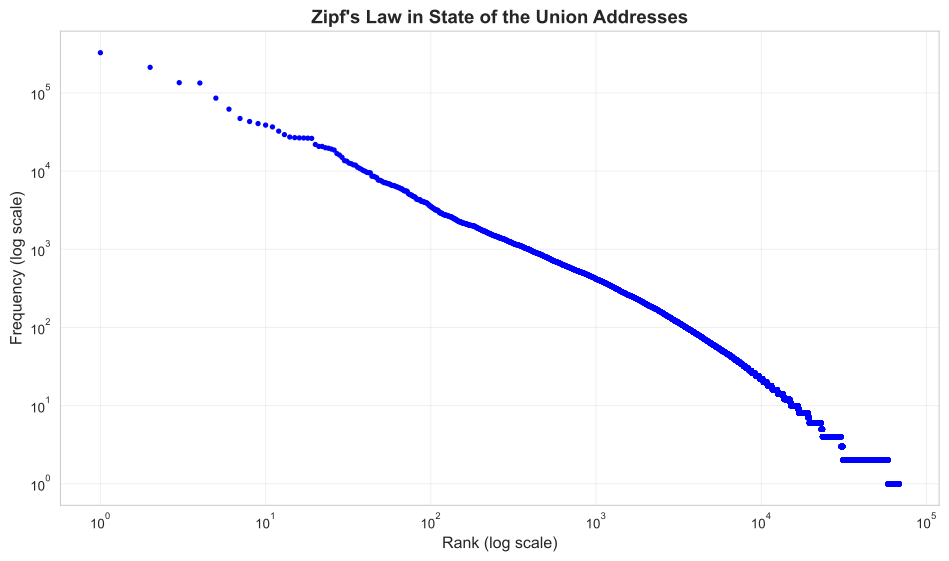
If you count word frequencies in any large collection of text and rank words by frequency, you’ll observe something remarkable:
The most common word appears roughly twice as often as the second most common word, three times as often as the third most common, and so on.
This is called Zipf’s Law (named after linguist George Kingsley Zipf).
8.2 Why Does This Matter?
Zipf’s Law tells us that:
A few words are very common (“the”, “of”, “and”)
Most words are very rare (appear only once or twice)
This pattern is universal - it appears in all languages and genres
This has practical implications:
Most words provide little statistical power (they’re too rare)
A small vocabulary covers most of any text
We need strategies to deal with this imbalance
8.3 Visualizing Zipf’s Law
Let’s see if our data follows Zipf’s Law:
# Add rank to our frequency tableword_freq['rank'] =range(1, len(word_freq) +1)# Create log-log plotplt.figure(figsize=(10, 6))plt.loglog(word_freq['rank'], word_freq['count'], 'b.')plt.xlabel('Rank (log scale)', fontsize=12)plt.ylabel('Frequency (log scale)', fontsize=12)plt.title("Zipf's Law in State of the Union Addresses", fontsize=14, fontweight='bold')plt.grid(True, alpha=0.3)plt.tight_layout()plt.show()
The nearly straight line on a log-log plot confirms Zipf’s Law!
8.4 The Long Tail
Let’s look at how many words appear only once or twice:
# Count words by frequencyfreq_distribution = word_freq['count'].value_counts().sort_index()print("Distribution of word frequencies:")print(f" Words appearing once: {freq_distribution.get(1, 0):,}")print(f" Words appearing twice: {freq_distribution.get(2, 0):,}")print(f" Words appearing 3-5 times: {freq_distribution.loc[3:5].sum():,}")print(f" Words appearing 6-10 times: {freq_distribution.loc[6:10].sum():,}")print(f" Words appearing > 100 times: {(word_freq['count'] >100).sum():,}")
Distribution of word frequencies:
  Words appearing once: 9,835
  Words appearing twice: 27,310
  Words appearing 3-5 times: 8,157
  Words appearing 6-10 times: 7,957
  Words appearing > 100 times: 3,484
This is the “long tail” - many rare words, few common words.
Important🎯 Key Insight
Zipf’s Law means that word frequencies are highly skewed. This affects how we:
Build statistical models
Select features for machine learning
Preprocess text
Interpret results
9 Stop Words and Preprocessing
9.1 What are Stop Words?
Stop words are extremely common words that appear frequently in almost any text:
Articles: the, a, an
Prepositions: in, on, at, to, from
Pronouns: I, you, he, she, it
Conjunctions: and, but, or
Auxiliary verbs: is, are, was, were
9.2 Why Remove Stop Words?
There are two main perspectives:
Reasons to remove stop words:
Content analysis: They don’t tell us about the topic
Computational efficiency: Fewer words = faster processing
Signal-to-noise: They can overwhelm more informative words
Reasons to keep stop words:
Stylometry: They reveal personal writing style
Syntax: Needed for parsing sentence structure
Meaning: Sometimes they matter (“not good” ≠ “good”)
9.3 Stop Words in Our Data
Let’s see what Python’s spaCy library considers stop words:
# Load English language model (small version)try: nlp = spacy.load("en_core_web_sm")except:# If not installed, show installation instructionsprint("Please install spaCy model:")print("!python -m spacy download en_core_web_sm")# For now, use a simple stopword listfrom spacy.lang.en.stop_words import STOP_WORDS stopwords_set = STOP_WORDSelse: stopwords_set = nlp.Defaults.stop_wordsprint(f"Number of stop words: {len(stopwords_set)}")print(f"\nFirst 30 stop words (alphabetically):")print(sorted(list(stopwords_set))[:30])
Number of stop words: 326

First 30 stop words (alphabetically):
["'d", "'ll", "'m", "'re", "'s", "'ve", 'a', 'about', 'above', 'across', 'after', 'afterwards', 'again', 'against', 'all', 'almost', 'alone', 'along', 'already', 'also', 'although', 'always', 'am', 'among', 'amongst', 'amount', 'an', 'and', 'another', 'any']
9.4 Comparing with Our Most Frequent Words
# Check which top words are stop wordstop_30 = word_freq.head(30).copy()top_30['is_stopword'] = top_30['word'].isin(stopwords_set)print("Top 30 words with stop word labels:")print(top_30[['word', 'count', 'is_stopword']])
Top 30 words with stop word labels:
     word   count  is_stopword
0     the  326862         True
1      of  212531         True
2      to  135329         True
3     and  133944         True
4      in   85772         True
5       a   61992         True
6    that   47130         True
7     for   43079         True
8      be   40521         True
9     our   38759         True
10     is   36752         True
11     by   32429         True
12     it   29271         True
13     we   27276         True
14   have   26784         True
15   this   26594         True
16     as   26510         True
17   with   26400         True
18  which   26237         True
19   will   21913         True
20     on   20689         True
21      i   20687         True
22    has   19896         True
23    are   19619         True
24   been   19135         True
25    not   18597         True
26  their   16784         True
27   from   16055         True
28     at   14991         True
29    all   13608         True
Notice how most of the top frequent words are stop words!
9.5 Removing Stop Words
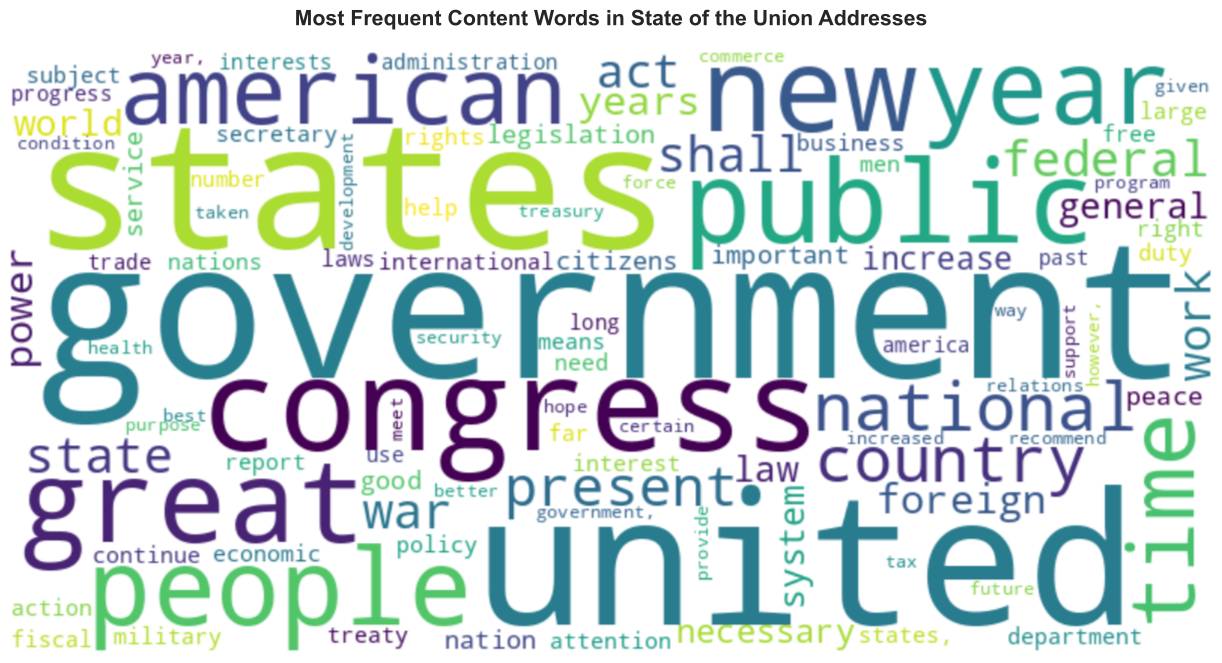
# Filter out stop wordscontent_words = word_freq[~word_freq['word'].isin(stopwords_set)].copy()print(f"Words before removing stop words: {len(word_freq):,}")print(f"Words after removing stop words: {len(content_words):,}")print(f"\nTop 30 content words:")print(content_words.head(30))
Words before removing stop words: 68,356
Words after removing stop words: 68,058

Top 30 content words:
            word  count  rank
35    government  11209    36
38        united  10158    39
42        states   9524    43
44      congress   8597    45
52           new   7120    53
56         great   6714    57
59        public   6520    60
62        people   6229    63
66          year   5918    67
69      american   5575    70
72          time   5162    73
76      national   4888    77
81       country   4367    82
82       present   4331    83
88       federal   4093    89
89         state   4073    90
90         shall   4006    91
91           war   3987    92
99          work   3501   100
100          act   3485   101
102      foreign   3369   103
103        years   3319   104
105        power   3206   106
106      general   3191   107
107          law   3171   108
108        world   3168   109
112       system   2931   113
116    necessary   2878   117
117     increase   2818   118
118  legislation   2790   119
Now we see more content-bearing words: government, states, congress, country, people, etc.
9.6 Visualizing Content Words
# Create word cloud from content wordswordcloud_dict =dict(zip(content_words['word'].head(100), content_words['count'].head(100)))wordcloud = WordCloud(width=800, height=400, background_color='white', colormap='viridis').generate_from_frequencies(wordcloud_dict)plt.figure(figsize=(14, 7))plt.imshow(wordcloud, interpolation='bilinear')plt.axis('off')plt.title('Most Frequent Content Words in State of the Union Addresses', fontsize=16, fontweight='bold', pad=20)plt.tight_layout()plt.show()
Tip💡 Preprocessing is a Choice
Whether to remove stop words depends on your research question:
Topic modeling: Usually remove
Sentiment analysis: Keep (negations matter!)
Stylometry: Keep (they reveal style!)
Document classification: Test both
10 Introduction to Stylometry
10.1 What is Stylometry?
Stylometry is the statistical analysis of writing style. It’s used to:
Attribute authorship: Who wrote this anonymous text?
Detect plagiarism: Did someone copy another’s style?
Study literary history: How did an author’s style evolve?
Forensics: Analyze threatening letters or disputed documents
10.2 The Surprising Power of Function Words
You might think content words (nouns, verbs) reveal writing style. But actually, function words (the stop words we just removed!) are more revealing because:
Unconscious use: Authors don’t think about them
High frequency: Provide strong statistical signal
Stable patterns: Less affected by topic
Individual variation: People use them differently
10.3 A Simple Example
Different presidents might discuss the same topics but use different grammatical structures:
“We must ensure…” vs “I believe we must…”
“This is important” vs “This has been important”
“The people” vs “Our people”
These tiny differences add up to distinctive “stylistic fingerprints.”
10.4 Analyzing Presidential Style
Let’s look at how often different presidents use personal pronouns:
# Define personal pronounspersonal_pronouns = ['i', 'me', 'my', 'we', 'us', 'our', 'you', 'your']# Filter for pronouns onlypronoun_df = tokens_df[tokens_df['word'].isin(personal_pronouns)].copy()# Count by presidentpronoun_by_president = (pronoun_df.groupby(['president', 'word']) .size() .reset_index(name='count'))# Calculate total words per president for normalizationwords_per_president = tokens_df.groupby('president').size()# Normalize (calculate rate per 1000 words)pronoun_by_president = pronoun_by_president.merge( words_per_president.reset_index(name='total_words'), on='president')pronoun_by_president['rate_per_1000'] = ( (pronoun_by_president['count'] / pronoun_by_president['total_words']) *1000)# Show some examplesprint("Sample of pronoun usage rates (per 1000 words):")print(pronoun_by_president[pronoun_by_president['president'].isin( ['Donald J. Trump', 'Barack Obama', 'George W. Bush'])].head(15))
Sample of pronoun usage rates (per 1000 words):
          president  word  count  total_words  rate_per_1000
24     Barack Obama     i    857       106566       8.041965
25     Barack Obama    me    120       106566       1.126063
26     Barack Obama    my    180       106566       1.689094
27     Barack Obama   our   1811       106566      16.994163
28     Barack Obama    us    287       106566       2.693167
29     Barack Obama    we   1927       106566      18.082691
30     Barack Obama   you    349       106566       3.274966
31     Barack Obama  your    113       106566       1.060376
56  Donald J. Trump     i    105        15058       6.973038
57  Donald J. Trump    me      5        15058       0.332049
58  Donald J. Trump    my     37        15058       2.457166
59  Donald J. Trump   our    331        15058      21.981671
60  Donald J. Trump    us     55        15058       3.652543
61  Donald J. Trump    we    319        15058      21.184752
62  Donald J. Trump   you     35        15058       2.324346
10.5 Visualizing Style Differences
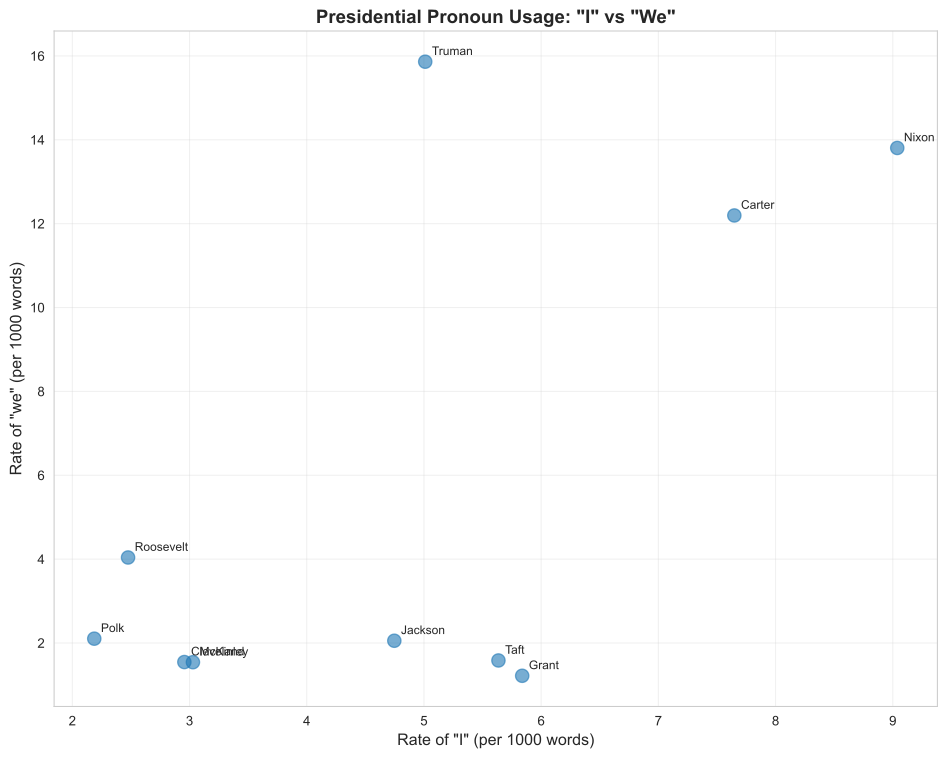
Let’s compare how different presidents use “I” vs “we”:
# Focus on 'I' and 'we'i_we_df = pronoun_by_president[pronoun_by_president['word'].isin(['i', 'we'])].copy()# Pivot for easier plottingi_we_pivot = i_we_df.pivot(index='president', columns='word', values='rate_per_1000').fillna(0)# Get presidents with most speeches for clearer visualizationtop_presidents = (tokens_df['president'] .value_counts() .head(10) .index)i_we_plot = i_we_pivot.loc[i_we_pivot.index.isin(top_presidents)]# Create scatter plotplt.figure(figsize=(10, 8))plt.scatter(i_we_plot['i'], i_we_plot['we'], s=100, alpha=0.6)# Label pointsfor idx, row in i_we_plot.iterrows():# Shorten long names name = idx.split()[-1] # Just last name plt.annotate(name, (row['i'], row['we']), xytext=(5, 5), textcoords='offset points', fontsize=9)plt.xlabel('Rate of "I" (per 1000 words)', fontsize=12)plt.ylabel('Rate of "we" (per 1000 words)', fontsize=12)plt.title('Presidential Pronoun Usage: "I" vs "We"', fontsize=14, fontweight='bold')plt.grid(True, alpha=0.3)plt.tight_layout()plt.show()
Note📌 What This Tells Us
Presidents who use “I” more often might be:
Speaking in a more personal style
Taking individual responsibility
Modern era (contemporary style)
Presidents who use “we” more might be:
Emphasizing collective action
Speaking for the nation
Earlier era (formal style)
These patterns can distinguish authors even when topics overlap!
10.6 The Role of PCA (Principal Component Analysis)
In a full stylometric analysis, we would:
Count many function words (not just pronouns)
Have dozens or hundreds of features
Need to reduce complexity to visualize patterns
PCA (Principal Component Analysis) helps by:
Finding the main “directions” of variation
Reducing many features to 2-3 dimensions
Allowing us to plot and compare texts
What PCA gives us (practically):
A 2D plot where similar authors cluster together
Ability to spot outliers or disputed authorship
Quantified measure of stylistic distance
We won’t dive into the mathematics here, but know that PCA is a standard tool for reducing complex data to interpretable patterns.
11 Summary and Key Takeaways
11.1 What We Learned
Today we covered the fundamental workflow of computational text analysis:
Load text data → Working with structured formats (CSV, DataFrame)
Tokenize → Split text into words (or other units)
Count frequencies → Transform text into numbers
Explore patterns → Zipf’s Law, frequency distributions
Preprocess → Remove stop words (when appropriate)
Analyze style → Use function words for stylometry
11.2 Key Concepts
Tokenization
Splitting text into units (words, characters, sentences)
Bag of Words
Treating text as unordered collection of words
Zipf’s Law
Word frequency follows power law distribution (few common, many rare)
Stop Words
High-frequency grammatical words with little content
Stylometry
Statistical analysis of writing style using function words
Preprocessing
Transforming raw text for analysis (lowercase, remove punctuation, etc.)
11.3 Tools in Your Toolkit
Task
Python Tool
Load data
pandas.read_csv()
Tokenize
str.split() or spaCy
Count frequencies
Counter() or value_counts()
Remove stop words
spaCy stop word list
Visualize
matplotlib, seaborn, wordcloud
11.4 Next Steps
In future labs, we’ll explore:
More sophisticated tokenization (handling punctuation, contractions)
N-grams (sequences of words)
TF-IDF weighting (smarter than raw counts)
12 Exercises
12.1 Exercise 1: Basic Frequency Analysis
Pick any president from the dataset and:
Extract all their speeches
Tokenize and count word frequencies
Create a bar plot of their top 20 words
Create a word cloud
12.2 Exercise 2: Stop Word Impact
Compare word frequencies with and without stop words:
Calculate top 50 words with stop words
Calculate top 50 words without stop words
How many overlap? What changes?
12.3 Exercise 3: Pronoun Style
Choose three presidents and compare their use of:
First person singular (“I”, “me”, “my”)
First person plural (“we”, “us”, “our”)
Create a visualization showing the differences.
12.4 Exercise 4: Historical Change (Advanced)
Compare speeches before and after 1950:
Split the dataset into two time periods
Calculate word frequencies for each period
Identify words that became more/less common
Create a Zipf’s Law plot for each period
13 References and Further Reading
13.1 Academic Papers
Piantadosi, S. T. (2014). Zipf’s word frequency law in natural language: A critical review and future directions. Psychonomic Bulletin & Review, 21(5), 1112–1130. https://doi.org/10.3758/s13423-014-0585-6